How Wix scaled AI-native work to 5,000 employees with Willow
Read More
BACKGROUND AGENTS · GOVERNED With WILLOw

Background Agents, Governed by Default.

Fire on a trigger, do the job, and log every step. Willow runs them on your managed harness, scopes each one to exactly the tools the task needs, and puts a named identity behind every action

Get Started
Four Willow AI agent mascots representing governed background agents
Trusted by
WATCH HOW IT WORKS

Agents that work for you, not with you. See it in 60 seconds.

Willow's CTO runs governed background agents at scale, from a hiking trail. Quick to build, simple to run, secured by default.

THE PROBLEM

Copilots wait for you. The work doesn't.

A copilot needs a human at the keyboard for every task. Someone researches every meeting, writes docs for every feature, triages every alert. More work means more people. That does not scale.

The tools that run agents in the background have their own problem. Hard to stand up, runaway cost, and no human in the loop. The agent just runs. So most teams keep it in a sandbox and never get the payoff.

NOT ANOTHER COPILOT

Background agents do real work, without you at the keyboard

Fires on a trigger, and finishes it end to end. A few already running on Willow:

Docs on every merge.
Code hits production, the agent reads the diff and writes the documentation.
Meeting prep agent.
Before every call, it researches the attendees, pulls the data, and posts the briefing to Slack.
Support triage agent.
New ticket arrives, it classifies, gathers context, and drafts the first response.
Code review agent
A pull request opens, it reviews, comments, and flags risk before a human looks.
On-call summaries
An alert fires, it assembles the timeline and root-cause candidates.
Competitive watch.
On a schedule, it checks sources and reports what changed.
Fires on any trigger.
A Slack message, a webhook, a new PR, or every morning at nine.
Runs in a loop
It acts, checks the result, and keeps going until the job is done.
Scales without headcount.
The thousandth run costs you the same attention as the first: none.
See it

Watch our CTO setting up background agents in 2 minutes

No slideware. Willow's CTO builds a governed background agent live: describe the job, pick a trigger, scope the tools, and watch it run. Start to finish, under two minutes.

Book a demo
HOW WILLOW RUNS BACKGROUND AGENTS

Quick. Simple. Secured.

Quick Setup

Describe the job, pick a trigger, done. Building a governed background agent takes a minute, not a sprint.

Simple Runtime

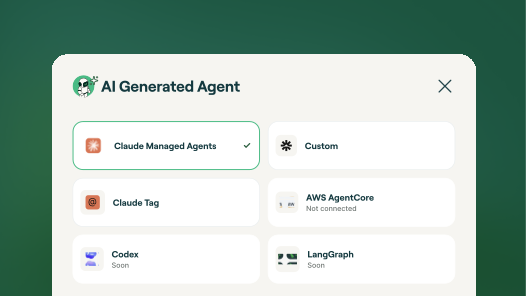
It runs on your managed harness, Claude Managed Agents, AWS Agent Core, or any custom harness, not on someone's laptop. Connect the platform once. Willow spins up agents and sessions behind the scenes.

Secured Access

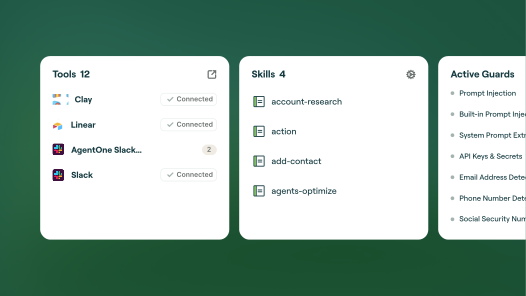
Scope each agent to exactly the tools the job needs, action by action. Put a named identity behind every action. See everything it does. Full control, full audit trail.

The platform

Everything you need to run background agents you can trust.

Trigger on anything.

Slack and Teams events, a schedule, a webhook, a new pull request, an alert.

Any managed harness.

Claude Managed Agents, AWS Agent Core, or your own. You are not locked to one runtime.

Scoped to the job, not the person.

Each agent gets only the tools the task needs. An agent should not inherit everything an employee can do.

Identity behind every action.

Every agent is a named worker tied to a human owner. The PR was opened by the agent, on the record.

Human-in-the-loop approvals.

Gate the actions that matter. The agent pauses, a human approves, then it ships.

Full audit trail to your SIEM.

Every action streamed to Splunk and Loki. A real forensic timeline.

Runtime guardrails.

PII redaction and policy enforced at the moment of action, not flagged after.

1000+ tools and skills.

Connect any MCP, skill, or internal API, and expose only the calls the agent needs.

Self-serve for employees.

Anyone can spin up their own agent, see what it did, and request more tools. Admins keep the guardrails.

DIY harness vs. Willow

Autonomous is easy. Governed is the hard part.

Plenty of tools inspect prompts and flag PII. Willow does that, then governs.

Roll your own
Hard to stand up, deep config to get running
Runs on endpoints and laptops
Cost runs away, no usage control
No human in the loop, the agent just runs
Inherits the user's full access
No identity, no audit
Willow
Describe the job and trigger, live in a minute
Runs on your managed cloud harness
Scoped tools and controlled usage
Human approval on the actions that matter
Scoped to the job, not the person
A named identity and a full audit trail on every action
Why it matters

The next step in agentic work is already here.

The teams pulling ahead are not prompting faster. They are handing whole jobs to background agents that run on their own, safely. Agents that work for you, not with you. The only question is whether yours run with an identity, a scope, and an audit trail, or without.

FAQS

What are background agents?
Background agents, also called autonomous or managed agents, run on their own. They fire on a trigger, work through the job in a loop, and log every step. Unlike a copilot, they do not need a human at the keyboard.
What makes a background agent governed?
A governed background agent has a named identity, a scope limited to exactly the tools its job needs, guardrails enforced at runtime, human approval on critical actions, and a full audit trail. Willow adds all of that on top of the harness the agent runs on.
How are background agents different from a copilot?
A copilot works with you, in your session, on your machine, with your identity. A background agent works for you. It runs in the background on a managed harness, with its own identity, and only the access you scoped to it.
Where do background agents run?
n your managed harness: Claude Managed Agents, AWS Agent Core, or a custom harness. Not on a laptop or an unmanaged endpoint. You connect the platform once and Willow runs agents and sessions on it.
How do I control what a background agent can do?
You scope each agent to exactly the tools the job needs, down to the specific action, not to everything the launching employee can do. Guardrails run at the moment of action, and you can require human approval on the actions that matter.
How do I trigger a background agent?
On a Slack or Teams event, a webhook, a new pull request, a system event, or a schedule such as every morning. You set the conditions and control when a new session opens or an existing one continues.
Can non-admins create background agents?
Yes. Employees can spin up their own agents, see what they did, and request more tools, without filing a ticket. Admins keep the guardrails.
Is it secure and compliant?
Every agent has an identity and a full audit trail. SOC 2 Type II, ISO, and GDPR-Ready. Deploy SaaS, dedicated cloud, or fully on-prem in your VPC.

Your agents are already in the wild.

Give them a Basecamp. Go from AI chaos to AI work, in minutes.