


Claude Guardrails: 7 Enforcement Options, Compared (2026)
Guardrails for Claude: Every Enforcement and Monitoring Option, Compared
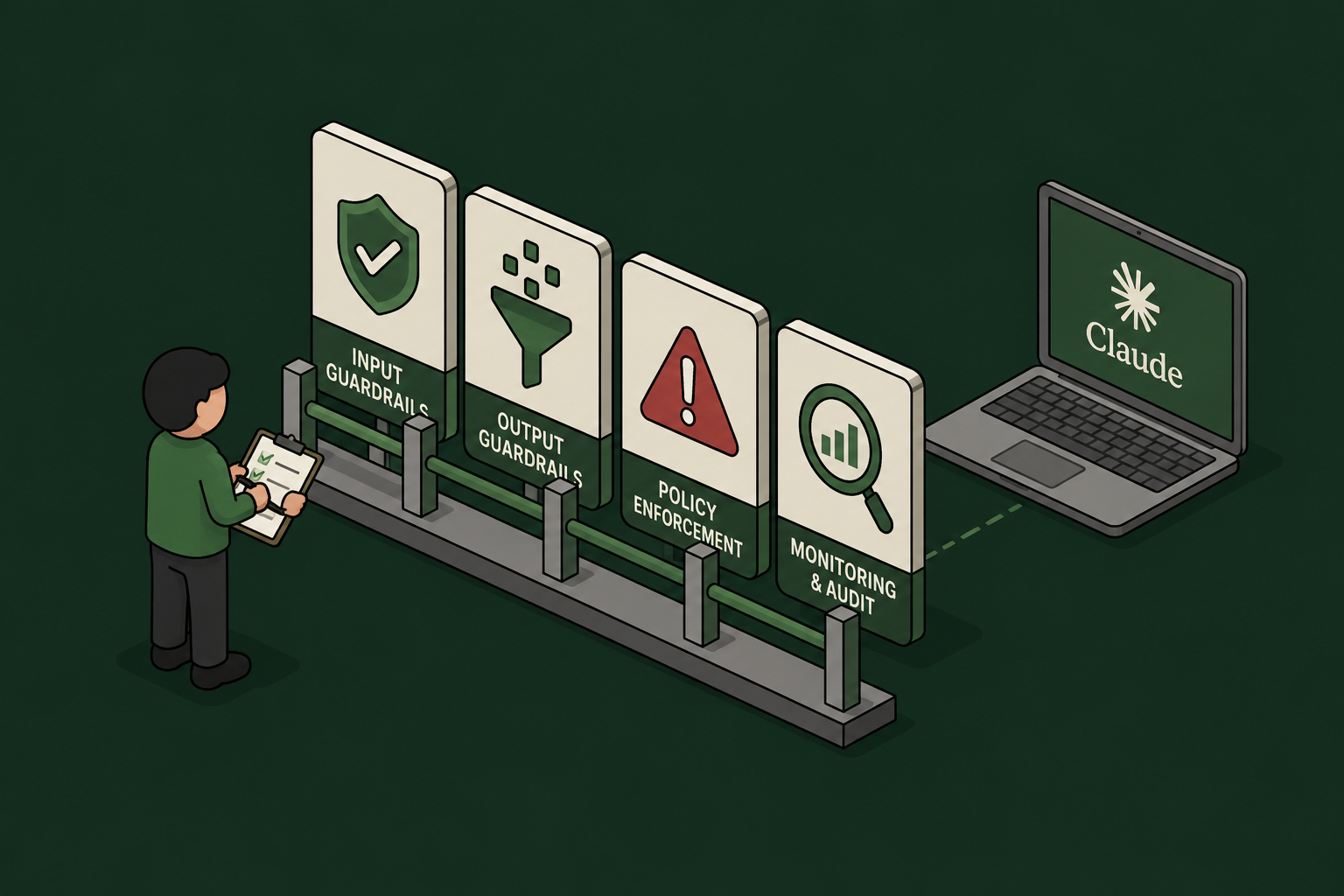
Claude is no longer one product. Employees reach it through claude.ai in the browser, Cowork sessions running in Anthropic's cloud, the Claude Desktop app, and the Claude Code CLI on developer laptops. Each surface has a different set of guardrail mechanisms – some enforce in real time, some only observe, and none covers everything on its own.
This guide maps out all seven options: the four Anthropic-native mechanisms (Claude Code hooks, Inference Hooks, OpenTelemetry export, and the Compliance API) plus the three deployment patterns that fill the gaps (browser extension, MCP Gateway, and AI Gateway).
And the landscape just shifted again. With the beta release of Inference Hooks, Anthropic now offers server-side, organization-wide enforcement for the first time – a real answer to the question security teams have been asking since claude.ai reached the enterprise. But it is Enterprise-only, allow-or-deny-only, and it overlaps confusingly with the client-side hooks, telemetry exports, and gateway patterns teams have already deployed. Every option now covers a different subset of surfaces, requires a different plan, sees different data, and supports different actions – which is exactly why a side-by-side comparison is worth writing down.
The comparison at a glance
Surfaces legend: Chat = claude.ai web · Cowork = Claude Cowork (cloud and desktop) · Code = Claude Code CLI · Desktop = Claude Desktop app

Option |

Claude surfaces |

Plan required |
.svg)
Data you see |

Actions |

Comments |
|---|---|---|---|---|---|

Plugin hooks
(Claude Code hooks) |
Code today; Cowork + Desktop by design | Any plan (Pro and up) | Full prompt text; every tool call before it runs (Bash commands, file edits, MCP parameters); tool results | Allowblockrequire approvalinject context | Client-side; richest pre-execution control. Deploy via plugin or managed settings |

Anthropic Inference Hooks
(beta) |
Chat, Cowork, Code, Desktop | Enterprise only | Conversation transcript, tool calls and results, extracted attachment text. No raw files, no system prompts | Allowdenyno redaction | Server-side, org-wide, nothing to install. 5s verdict timeout; shadow mode and % rollout |

OpenTelemetry
— Claude Code |
Code only | Any plan | Prompts (opt-in), Bash commands and tool parameters (opt-in), tokens, cost | Observe onlydetect and alert | Content logging off by default; lock the collector via managed settings |

OpenTelemetry
— Cowork |
Cowork (cloud, web, mobile, desktop) | Team or Enterprise | Full prompt text (on by default), tool/MCP invocations, file access, approval decisions, cost | Observe onlydetect and alert | Configured in org settings; events correlated per prompt via prompt.id |
|
Compliance API
|
Chat, Cowork, Code (activity), org directory | Enterprise (full); Console orgs: Activity Feed only | Full chat content, files, projects, Cowork transcripts, activity records, users and settings | Retrieveauditdeleteafter the fact | Pull-based, 600 req/min. The remediation layer |

Browser extension
|
Chat (browser only) | Any plan | Prompt text and files at submission; network actions in the browser | Scan and block before submit | Per-user install; the non-Enterprise fallback for claude.ai |

MCP Gateway
|
All surfaces using MCP connectors | Any plan with custom connectors | Tool calls only: server, tool, parameters, results | Allowblockredactauthenticaterate-limitaudit | Governs what Claude does, not what users say; one choke point for every surface |

AI Gateway
(LLM proxy) |
Code (via base-URL config) and API apps | API/Console billing or self-managed endpoint | Complete request and response: prompts, context, tool calls, completions | Allowblockredactrewriteroute | Deepest inspection, narrow coverage — consumer surfaces cannot be proxied |
The four Anthropic-native mechanisms
1. Plugin hooks (Claude Code hooks) – inline control wherever the harness runs
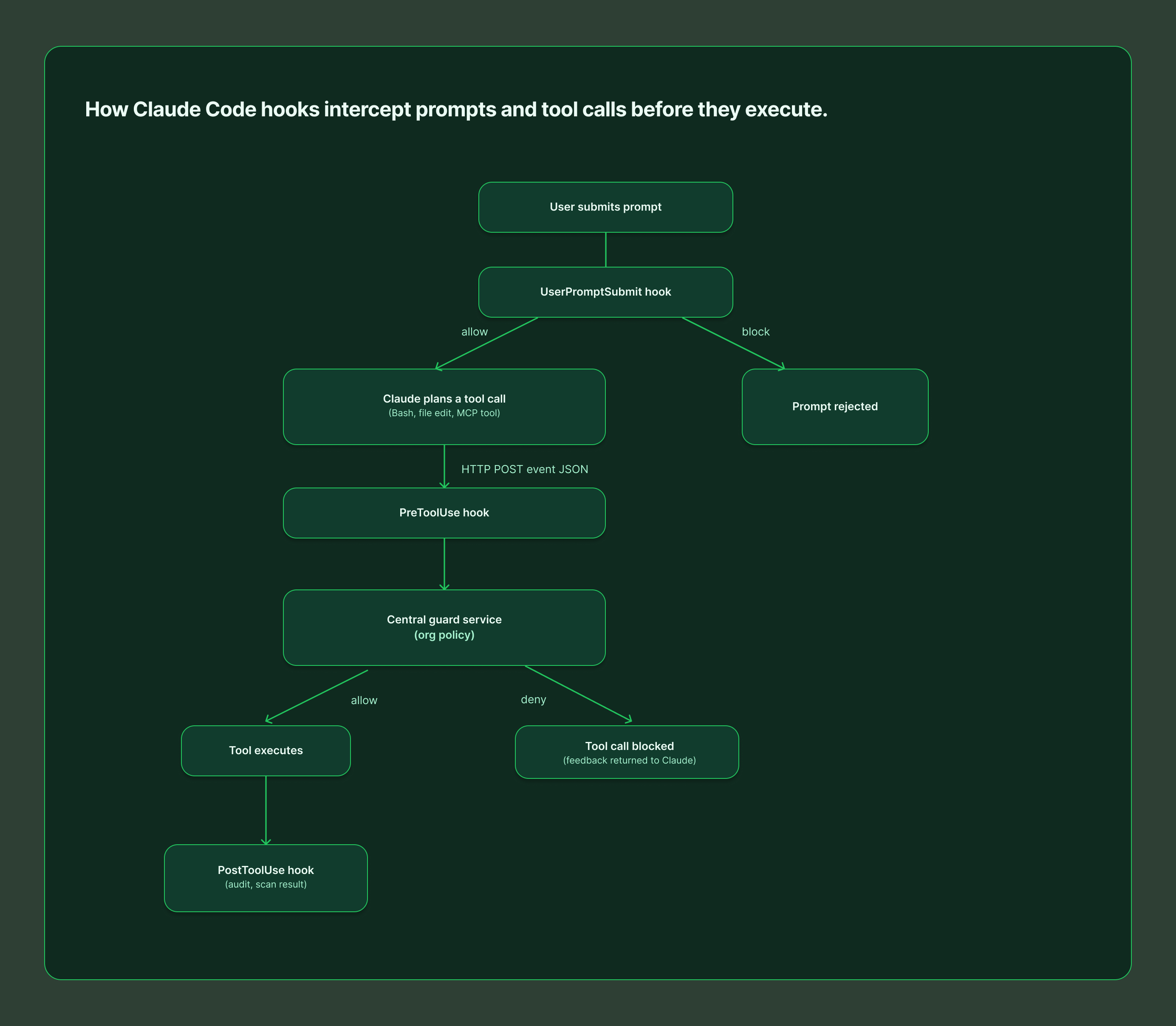
Claude Code fires lifecycle events for everything the agent does, and hooks let you intercept them: UserPromptSubmit before Claude processes a prompt, PreToolUse before any tool call executes (with the ability to block it), PostToolUse after it succeeds, plus dozens more covering permissions, subagents, and session lifecycle.
This is the only mechanism that sees a Bash command before it runs and can stop it. Hooks can execute a local script, call an MCP tool, or POST the event JSON to an HTTP endpoint – which is how centralized guard services evaluate every prompt and tool call against org policy in real time. Hooks ship as plugins, so distribution is a one-time install (or a managed-settings deployment for fleet enforcement). The trade-off: it's client-side – without managed settings, a determined user can remove the hook.
Best for: engineering organizations that need pre-execution control over commands, file edits, and MCP tool calls.
2. Anthropic Inference Hooks – server-side enforcement for Claude Enterprise
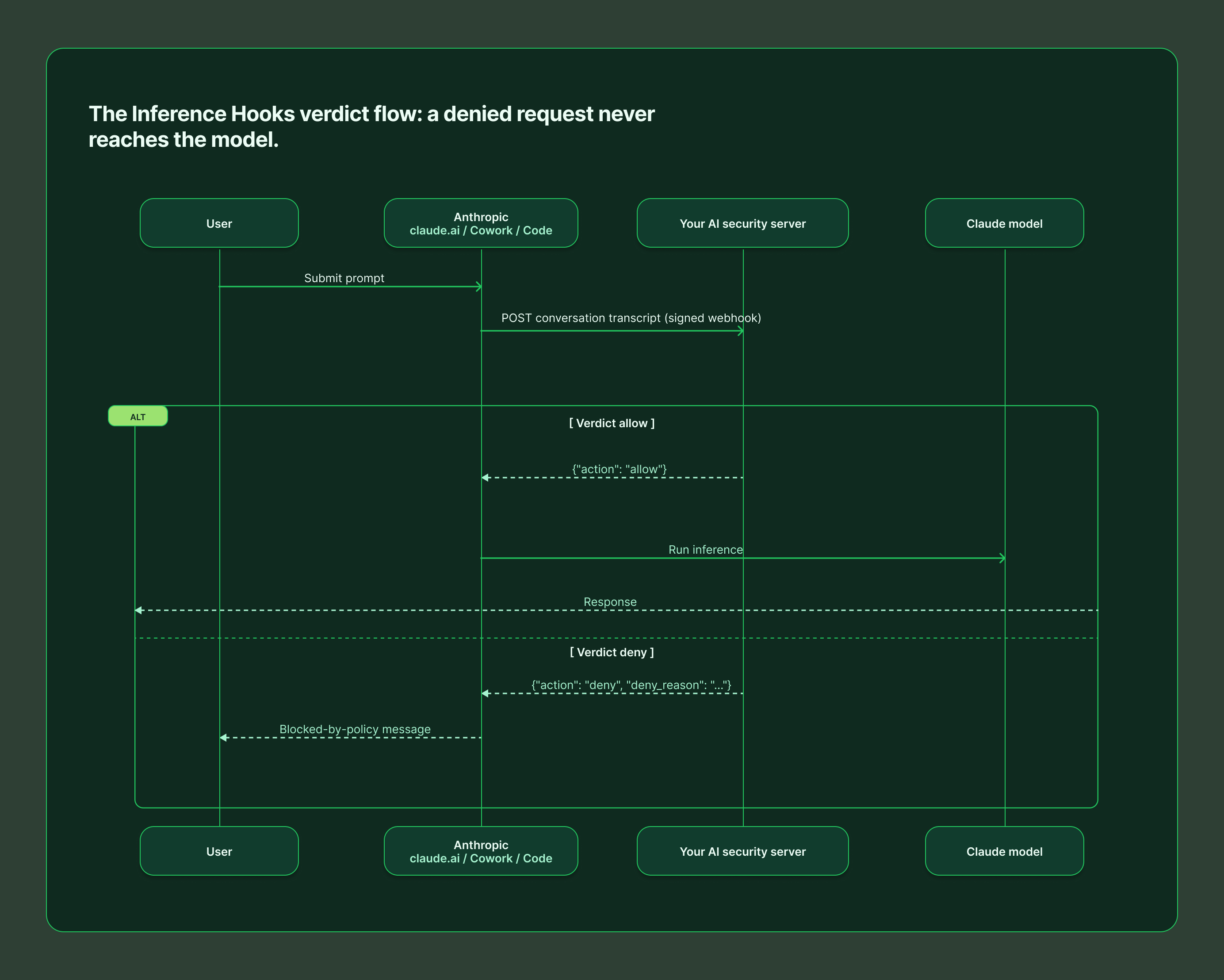
Inference Hooks (beta, Enterprise only) are the opposite deployment model: Anthropic's servers call your HTTPS endpoint before inference runs, and a denied request never reaches the model. One configuration governs claude.ai, Cowork, and Claude Code across web, desktop, and CLI – with nothing installed on user devices.
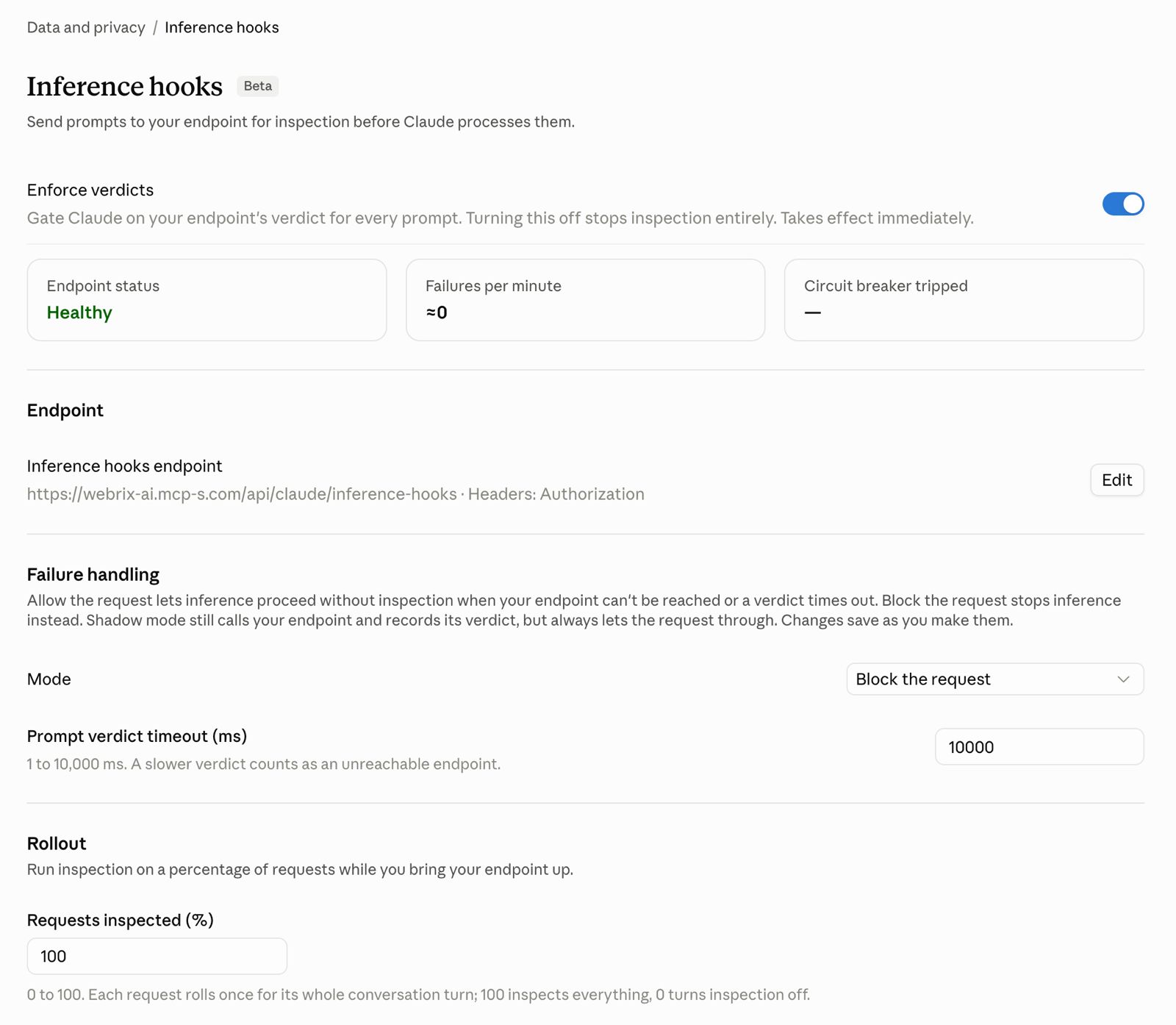
Your endpoint receives the conversation transcript, tool calls and their results, and text extracted from attachments (never raw file or image bytes, and never system prompts). It must answer within the configured timeout (5 seconds by default) with a verdict: allow, or deny with a user-facing reason. There is no redaction or rewriting – a violating prompt is blocked outright, and the denial lands in the org's Activity Feed.
Rollout is gradual by design: shadow mode observes verdicts without blocking, a rollout percentage inspects a fraction of traffic, and role exclusions exempt chosen users. You also choose failure handling – fail open or fail closed – when your endpoint is unreachable.
Best for: organizations on Claude Enterprise that want org-wide, unbypassable DLP with zero endpoint agents.
3. OpenTelemetry – the visibility layer
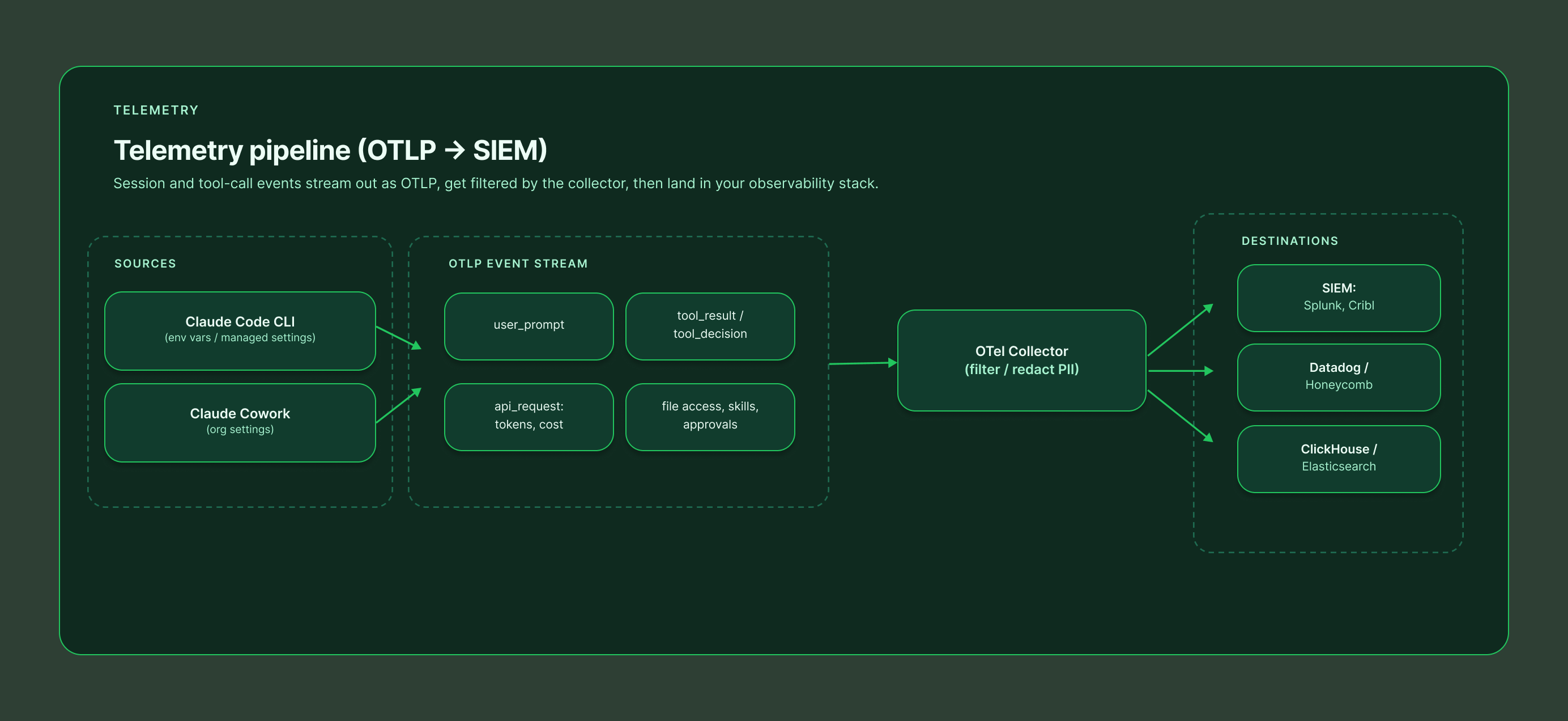
Both Claude Code and Cowork can stream structured events to any standard OTel collector, feeding the SIEM and observability stack you already run.
Claude Code exports metrics (sessions, tokens, cost) and events (user_prompt, tool_result, tool_decision, api_request, and more) via environment variables or managed settings. It is privacy-first by default: prompt content, Bash commands, and tool parameters are all redacted unless you explicitly opt in with OTEL_LOG_USER_PROMPTS, OTEL_LOG_TOOL_DETAILS, and related flags. Managed settings can lock the OTLP destination so developers cannot reroute the stream.
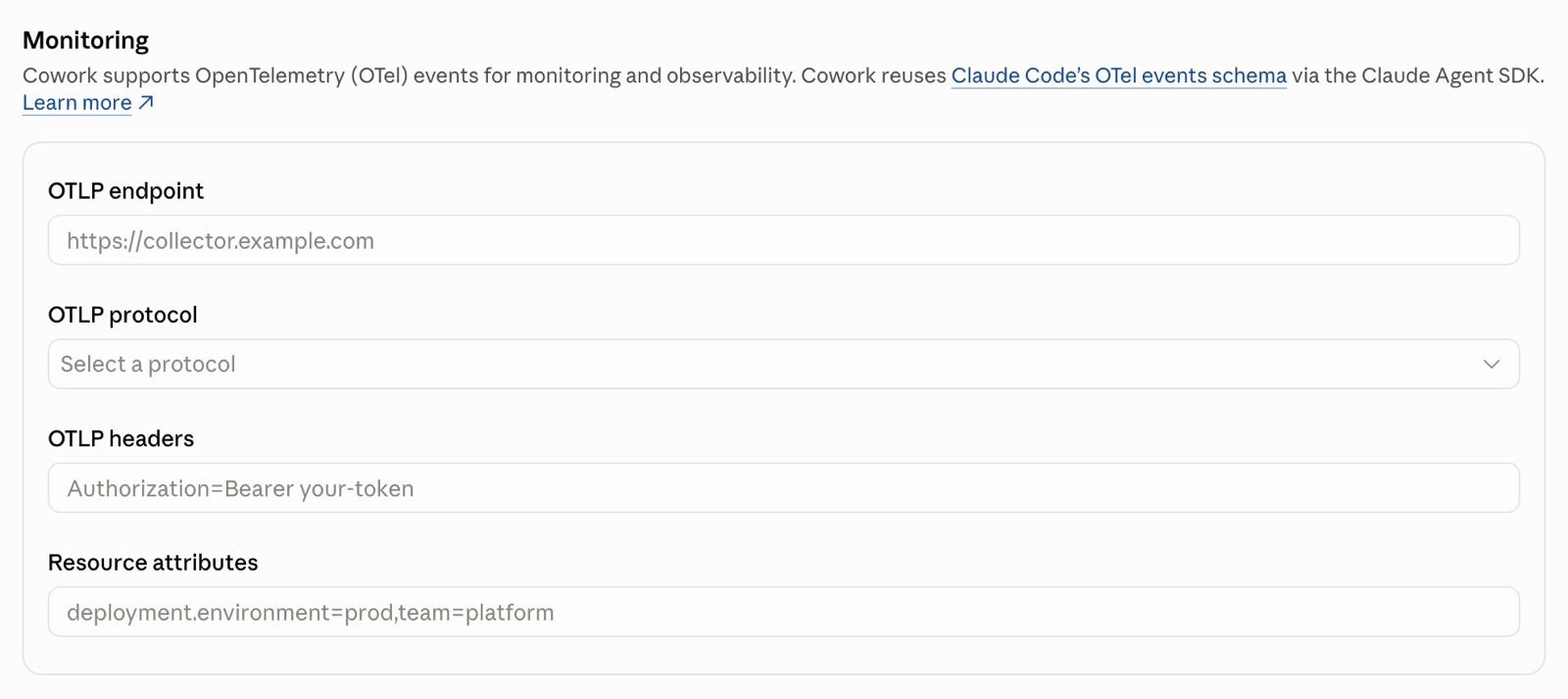
Cowork (Team and Enterprise) is configured once in organization settings and covers cloud, web, mobile, and local desktop sessions. It is more revealing by default – full prompt text, tool and MCP invocations with parameters, file access paths, skill and plugin usage, and human approval decisions all flow out of the box, correlated per prompt via a shared prompt.id. Filter or redact at your collector if policy requires it.
The critical limitation: OTel observes. It will tell you a secret was pasted into a prompt; it will not stop it.
Best for: security monitoring, incident investigation, usage and cost analytics, and alerting on policy violations after they happen.
4. Compliance API – the audit and remediation layer
The Compliance API gives Enterprise organizations programmatic, pull-based access to everything that already happened: the Activity Feed of per-event records, full chat content and attachments, projects, Cowork remote-session transcripts, and the directory of users, roles, and settings across linked organizations. Uniquely, it can also delete chats, files, and projects on demand – making it the remediation arm of a guardrail program.
Standalone Claude Console (API) organizations get the Activity Feed only, via an Admin API key. Everything runs under a 600 requests/minute rate limit per parent org.
Best for: eDiscovery, retention enforcement, SIEM ingestion, and cleaning up after an incident that a real-time layer flagged.
The three gap-fillers
5. Browser extension – guarding claude.ai without Enterprise
Inference Hooks require an Enterprise plan. For every other org, the practical way to guard claude.ai is a browser extension that scans the prompt and attached files before the submit button does anything, blocking or warning on policy violations client-side. Extensions can also watch the network actions Claude takes inside the browser.
It works on any plan and deploys per user (or fleet-wide via Chrome enterprise policy). The honest caveat: it is a device-level control. A user on an unmanaged browser or personal device walks right past it, so treat it as a strong default rather than a hard boundary.
Best for: Team and Pro/Max orgs that need claude.ai coverage today, and as a defense-in-depth layer alongside server-side controls.
6. MCP Gateway – governing what Claude does
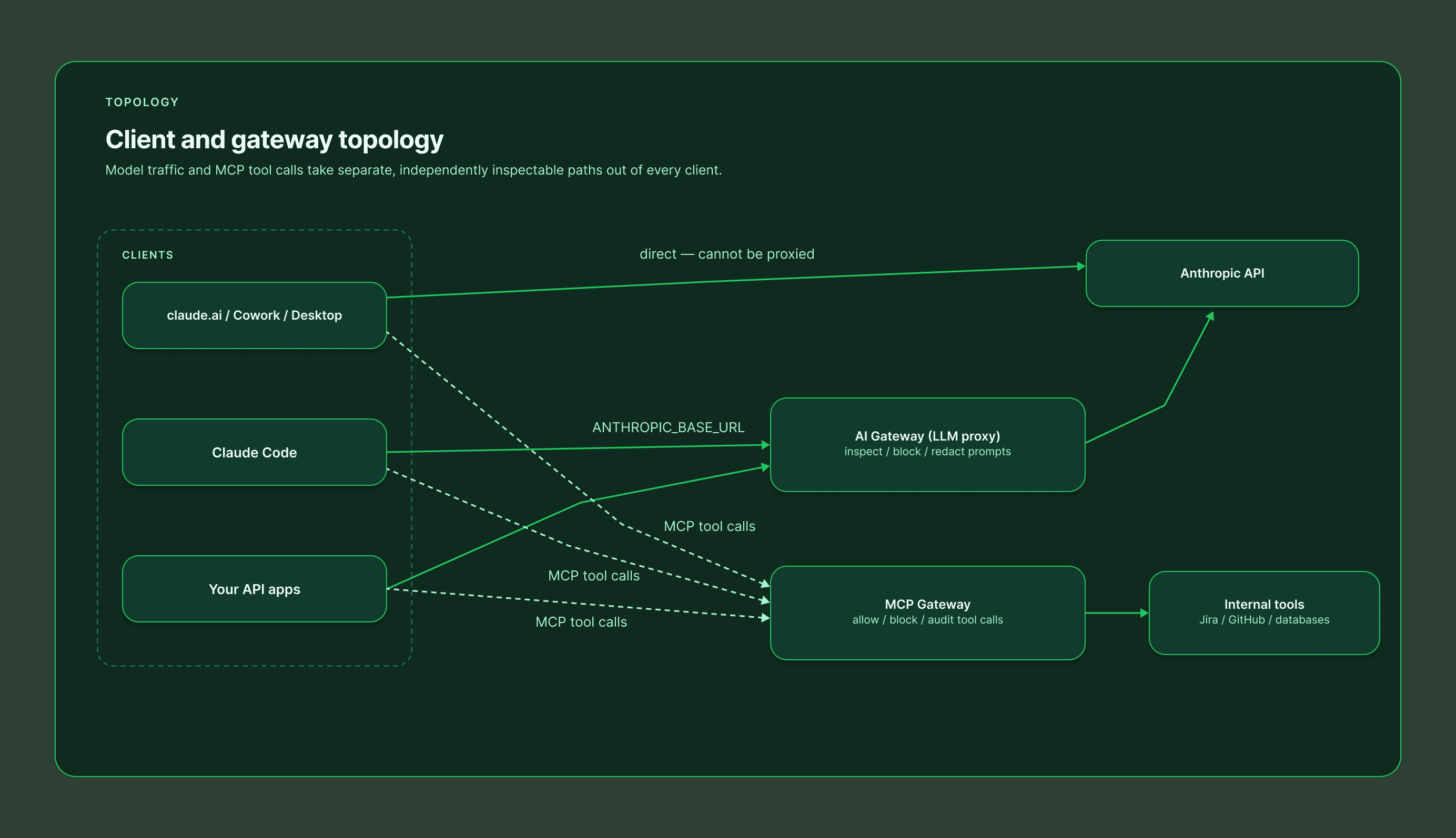
Everything above governs the conversation. An MCP gateway governs the actions: it sits between Claude and your tools (Jira, GitHub, databases, internal APIs), so every tool call from every surface – chat, Cowork, Desktop, Claude Code – flows through one policy point.
At that choke point you can allow or block individual tools per user or group, redact sensitive fields from tool responses, enforce authentication and rate limits, and keep a complete audit trail of every action Claude took on your systems, with credentials held centrally instead of scattered across user machines. It will not see the prompt itself – that is by design. It is the complement to a conversation-layer guard, not a replacement.
Best for: any organization connecting Claude to internal systems. This is the layer that turns "Claude can access our tools" into "Claude can access our tools under policy."
7. AI Gateway – proxying the model traffic itself
An AI gateway (LLM proxy) intercepts the API traffic between the client and Anthropic, seeing the complete request and response: full prompt, conversation context, tool definitions, and completions. That enables the richest action set of any option – block, redact, rewrite, rate-limit, log, even route to a different model.
The catch is coverage. Only traffic you can repoint works: Claude Code supports gateway configuration, and your own API-based applications obviously do – but claude.ai, Cowork, and Claude Desktop talk directly to Anthropic and cannot be proxied. An AI gateway is a deep control for a narrow slice, and it brings operational weight: added latency, availability risk, and API key management.
Best for: organizations running Claude Code at scale against a central endpoint, or building their own Claude-powered applications.
What about custom harnesses and the raw API?
Everything above assumes your users sit in Anthropic's packaged surfaces. Many organizations also build their own agents – directly on the Anthropic API, on the Claude Agent SDK, or on an open-source harness. None of the guardrails in this guide apply there automatically: Inference Hooks explicitly exclude Platform (API) organizations, the managed OpenTelemetry pipelines cover only Claude Code and Cowork, and the Compliance API does not see your application's traffic.
The flip side is that you own the whole control plane. An AI gateway in front of your model endpoint gives you inspection and blocking on every request. The Claude Agent SDK exposes the same hook events as Claude Code (UserPromptSubmit, PreToolUse, and the rest), so the guard service you built for developer laptops can enforce the same policy inside your custom harness. Tool access still belongs behind an MCP gateway, and telemetry is yours to emit. In short: custom harnesses get no guardrails for free, but they are also the one place where every layer is fully under your control.
Putting it together: a layered reference architecture
No single option covers every surface with every action, so mature deployments stack them:
1. Enforce the conversation layer – Inference Hooks if you are on Enterprise (all surfaces, server-side); Claude Code hooks plus a browser extension if you are not.
2. Enforce the action layer – an MCP gateway in front of every tool Claude can touch, regardless of plan.
3. Watch everything – OpenTelemetry from Claude Code and Cowork into your SIEM for detection, alerting, and cost visibility.
4. Keep the receipts – the Compliance API for audit, retrieval, and deletion when something slips through.
One platform for every layer: Willow
If stitching five mechanisms together sounds like a lot, that is the problem Willow was built to solve. Willow implements every layer in this guide as a single product with one policy engine and one audit trail:
• Guard hooks for Claude Code, Cursor, and Codex – a plugin that evaluates every prompt and tool call against your organization's runtime guards before it executes.
• A ready-made Inference Hooks endpoint – Enterprise orgs paste one URL and an org token into claude.ai and get server-side enforcement across chat, Cowork, and Claude Code.
• A browser Prompt Guard that scans prompts and files submitted to claude.ai, ChatGPT, and Gemini, plus a Chrome extension guard for the network actions Claude takes in the browser.
• An MCP gateway with per-tool allow/block policies, centralized credentials, and full audit of every action AI agents take on your systems.
• Shadow-AI scanning and coverage tracking, so you can see which surfaces are actively protected and which employees are using AI tools you have not approved yet.
Whatever mix your plan allows – Inference Hooks on Enterprise, hooks and extensions everywhere else — Willow deploys and manages it from one dashboard, with a single set of guards enforced identically on every surface. Learn more at withwillow.ai or explore the docs at docs.withwillow.ai.
Sources: Anthropic Inference Hooks and Compliance API documentation (platform.claude.com), Claude Code plugins and monitoring references (code.claude.com), and the Cowork OpenTelemetry guide (support.claude.com).
Background Agents in the Enterprise
Most teams can spin up an agent. Few can deploy one their security team signs off on. Here's the framework that does both.
FAQS
A beta, Enterprise-only mechanism where Anthropic's servers call your HTTPS endpoint before inference runs, so a denied request never reaches the model. One configuration governs claude.ai, Cowork, and Claude Code across web, desktop, and CLI, with nothing installed on user devices. Verdicts are allow or deny only, with no redaction, on a 5-second timeout.
Not currently. Although Cowork and Desktop run the same Claude Code harness, the Cowork VM spawns the CLI with --setting-sources user, which excludes plugin-scoped hook discovery, so plugin hooks are silently ignored (issues #27398 and #63047, open since February 2026). Until that is fixed, treat hook enforcement as Claude Code CLI only and cover Cowork with Inference Hooks.
Use a browser extension that scans the prompt and attached files before submit and can block or warn on policy violations client-side. It works on any plan and can deploy fleet-wide via Chrome enterprise policy, but it is a device-level control that a user on an unmanaged browser can bypass.
Not automatically. Inference Hooks exclude Platform (API) organizations, the managed OpenTelemetry pipelines cover only Claude Code and Cowork, and the Compliance API does not see your application's traffic. You own the control plane instead: an AI gateway in front of your endpoint, Agent SDK hooks (the same events as Claude Code), an MCP gateway for tool access, and your own telemetry.
Everything you need to get your Basecamp running.
Your agents are already in the wild.
Give them a Basecamp. Go from AI chaos to AI work, in minutes.
