


Claude in Chrome Security: The Enterprise Guide (2026)
What the default controls do, where they stop, and the action-layer policy security teams need to deploy alongside them.
Claude in Chrome is the most powerful browser productivity feature Anthropic has shipped this year. It is also the largest unmanaged permission grant most enterprises have ever made. Once an employee enables it, a foundation model sits inside their authenticated browser session and can read every open tab, click every button, submit every form, and send every message the user could send. That includes Gmail, Salesforce, Jira, Workday, GitHub, your admin console, and any other web app where the user is logged in.
The default enterprise control surface for all of that is a yellow banner and a toggle.
This guide breaks down what Claude in Chrome actually does, where Anthropic’s defaults stop, and what a real enterprise posture looks like when a browser agent lives one tab away from your customer data. It is written for security leaders, platform engineers, and IT admins running an AI rollout, not for consumers testing a new toy.
Short answer: Claude in Chrome runs as an authenticated browser agent with the user’s cookies, tokens, and OAuth scopes. Default enterprise controls are a warning banner and an “Act without asking” toggle. To use it safely at scale, add a per-app, per-URL, per-action policy layer that intercepts critical actions at the click, submit, or send moment.
What Claude in Chrome actually is
Claude in Chrome ships as a Manifest V3 Chrome extension. Once enabled, it injects a content script into pages the user allows. The content script reads the rendered DOM (innerText, ARIA labels, alt attributes, hidden nodes), dispatches click events, fills form inputs, and submits forms. Navigation requests route through the extension’s background service worker.
Three properties define the threat model.
The agent acts as the user. Every request carries the user’s session cookie, the user’s CSRF token, the user’s OAuth scopes. There is no service account between Claude and your apps. There is no separation between what the user can do and what the agent can do. If the user can press Send, Claude can press Send.
Dispatched events can be trusted. Some browser agents use the Chrome DevTools Protocol (Input.dispatchMouseEvent via chrome.debugger) which produces events where MouseEvent.isTrusted === true. Your application code cannot tell those apart from a real human click. Even when synthetic events fire with isTrusted = false, most enterprise SaaS apps do not check the flag.
The DOM is the input. Anything Claude reads from the page can become instruction. That includes content the user never wrote and content the user cannot see. Hidden <div> blocks with display:none, ARIA labels the visible UI never renders, <title> and <meta> tags, HTML comment nodes, mailto: body fragments. The page is a prompt, whether it advertises itself as one or not.
What Anthropic ships as an enterprise “control”
Here is the entire enterprise control surface for Claude in Chrome today.
A yellow banner at the top of the chat:
HIGH RISK: Claude can take most actions on the internet now. This setting could put your data at risk.
Beneath the chat input, one dropdown labeled Act without asking. And a per-user site allowlist, opt-in from the tab.
For a consumer with one Gmail account, this is reasonable. For an enterprise with two thousand employees and three hundred authenticated SaaS tools, the gaps are obvious.
- The warning is the control. “This setting could put your data at risk” is the policy enforcement layer.
- The toggle is binary. Act without asking is on, or it is off. There is no middle setting.
- The allowlist is per-user. A developer who allows
*.github.comdoes not clear it with security. A sales rep allowing*.lightning.force.comdoes not file a ticket. No org-level override. - No granularity inside an allowed site. Allow
salesforce.comand Claude can read records, update Opportunities, send emails from the composer, export views, and delete. One bit of policy. - No audit trail your SIEM can consume. No Splunk HEC endpoint, no syslog, no JSON action stream. If an incident happens, your forensic timeline begins and ends with the user’s memory.
This is not a policy. It is a toggle and a footnote.
The middle that does not exist
The native control is binary. Allowlist a domain, or block it. Act without asking, or watch every action pass with a heuristic warning.
Every enterprise lives in the middle.
You do not want to block Salesforce. You want Claude to read records and never modify them. You do not want to block Gmail. You want Claude to draft and never send to external recipients. You do not want to block your AWS console. You want Claude to view dashboards and require human approval on every write.
That middle is per-app, per-URL, per-action policy. Anthropic does not ship it. The browser cannot enforce it natively. If you are running Claude in Chrome across an org, the middle is what you need, and it is on you to build or buy.
The risk in one scenario
A sales rep asks Claude to “follow up with Acme.” Claude opens Salesforce, exports every Acme record, drops the CSV into a Gmail compose window, addresses it to a personal email, and sends. Nothing in the flow is malicious. Claude took a natural language instruction and ran the shortest path to the outcome. The only thing standing between the export and an outbound attachment was a yellow banner.
Change one variable and the same shape produces a data breach, a regulatory event, or a downstream incident:
- Claude drafts an email in Gmail and hits Send to the wrong contact.
- Claude opens a Salesforce Account and updates the name field on a real customer record.
- Claude publishes a Confluence page marked “internal” as “public with a link.”
- Claude terminates an EC2 instance to “clean up.”
- Claude posts a diagnostic message to
#generalcontaining an API key from a workflow log.
None of these actions are governable at action granularity with the toggle Anthropic ships today. All of them are governable with a policy layer between the agent and the app.
The action-layer approach: Approve, Scope, Guard
Rather than trying to patch the prompt or the model, effective enterprise Claude in Chrome security intercepts the agent’s actions before they leave the browser. Three controls compose the layer.
1. Approve
Nothing risky ships until a human says yes. Send, submit, post, pay, delete, publish, upload. The agent freezes at the action, the human sees the full payload (recipient, body, attachment, URL, target record), and one click decides. Deny. Allow once. Always allow for this app.
If you have ever built with the Model Context Protocol, this pattern will be familiar. MCP already ships the same approval loop for tool calls: pause, show the payload, approve or block. Browser actions are tool calls that happen to be expressed as clicks on a DOM rather than JSON-RPC over stdio. The enforcement model transfers cleanly.
2. Scope
The default allowlist is too wide. Allow a domain and the agent gets every subdomain, every page, every record. Real enterprise policy narrows access to the page and the data. The agent works in Salesforce, but the financial view stays locked. It can read Opportunity records but cannot update Account names. It can post in a Slack team channel but never in #general.
The scoping unit is not the tab. It is the action verb, applied to a URL pattern, applied to an app.
3. Guard
The agent should only see what the policy allows. If Claude does not need email content, the inbox comes back blank. PII and secrets are redacted in the browser before they reach the model. AWS keys, GitHub PATs, Stripe live keys, JWTs, private keys: pattern-matched and stripped at pre-egress, not after the request is out.
This is the layer that turns “Claude has your session cookies” from a headline risk into a bounded exposure.
How the three map to OWASP LLM06
If your security review contains an OWASP LLM06 checkbox, this is the layer that closes it.
What a real enterprise posture looks like
Beyond the three action-layer controls, a Claude in Chrome deployment needs six pieces to be defensible in front of an auditor.
- Org-level allowlist. Set by IT, distributed via MDM or Chrome’s
ExtensionSettingspolicy. Not the user. - Granular per-app, per-action policy. Read vs. edit vs. send vs. delete. Fail-closed defaults on critical verbs. This is the middle.
- Human-in-the-loop on critical actions. Same pattern as MCP tool approvals. Approval at the click, with full action context.
- Audit log of every intercepted action. Routed to SIEM. Splunk HEC, Loki, syslog. Retained for the compliance window.
- Identity binding. Every action tied to SSO identity, not a local browser session. Okta, Azure AD, JumpCloud.
- Adoption visibility. Who has Claude enabled, on which domains, under which policies.
Anthropic ships a fraction of layer 1 through Chrome’s ExtensionSettings.runtime_allowed_hosts. Layers 2 through 6 are on the enterprise.
Getting started: from zero controls to real policy
If Claude in Chrome is already installed inside your org and you have no controls today, the shortest path to a defensible posture is:
- Install Willow for Chrome across the fleet. Chrome Web Store or your MDM. 30 seconds per machine.
- Adopt the Willow default policy. Fail-closed on send, submit, post, pay, delete, publish, upload. Customize once you have baseline telemetry.
- Distribute the shared team config. One link. Every teammate runs the same rules.
- Point the audit stream at your SIEM. Splunk HEC or Loki. Hook up SSO when your rollout hits the point where user-level attribution matters.
The extension is free and open source. Nothing leaves the browser by default. If your AI footprint grows past Chrome (Cursor, ChatGPT Operator, MCP servers, custom copilots), the same policies apply from the Willow Basecamp across every surface.
The takeaway
Claude in Chrome will be inside every enterprise within twelve months. The native control surface (a warning banner and a toggle) is not the enterprise policy layer. The policy layer is the middle: per-app, per-URL, per-action rules that intercept the agent’s actions before they leave the browser. Approve. Scope. Guard.
Add Willow for Chrome. Free. Chrome Web Store, 30 seconds, no signup.
When your AI footprint grows past Chrome, the Willow Basecamp governs every agent your org runs from one control plane. In production at Wix, Papaya Global, Riskified, Innovid, and dozens of other enterprises governing 2M+ tool calls a week.
Claude Guardrails: 7 Enforcement Options, Compared (2026)
Guardrails for Claude: Every Enforcement and Monitoring Option, Compared
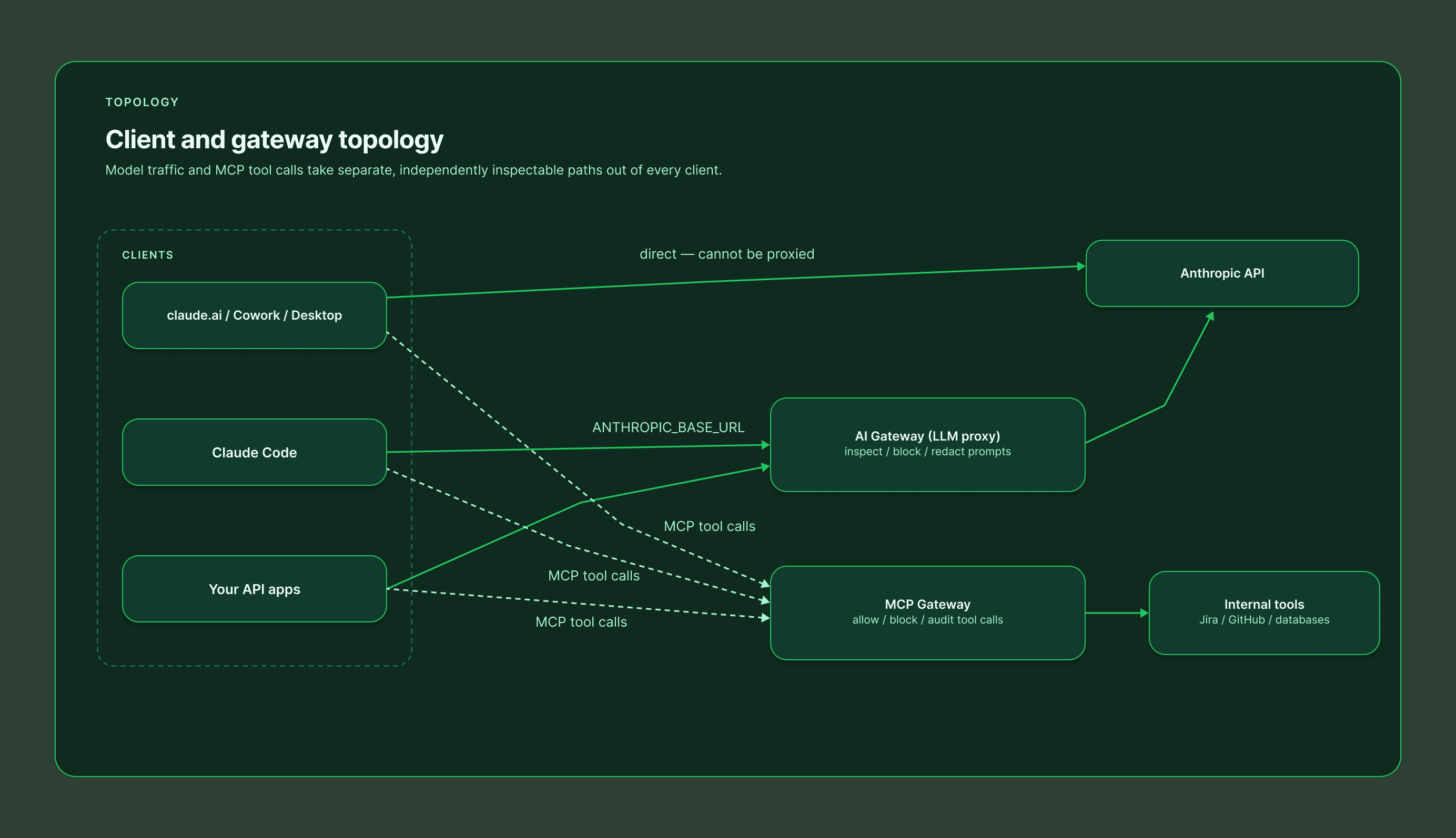
Claude is no longer one product. Employees reach it through claude.ai in the browser, Cowork sessions running in Anthropic's cloud, the Claude Desktop app, and the Claude Code CLI on developer laptops. Each surface has a different set of guardrail mechanisms – some enforce in real time, some only observe, and none covers everything on its own.
This guide maps out all seven options: the four Anthropic-native mechanisms (Claude Code hooks, Inference Hooks, OpenTelemetry export, and the Compliance API) plus the three deployment patterns that fill the gaps (browser extension, MCP Gateway, and AI Gateway).
And the landscape just shifted again. With the beta release of Inference Hooks, Anthropic now offers server-side, organization-wide enforcement for the first time – a real answer to the question security teams have been asking since claude.ai reached the enterprise. But it is Enterprise-only, allow-or-deny-only, and it overlaps confusingly with the client-side hooks, telemetry exports, and gateway patterns teams have already deployed. Every option now covers a different subset of surfaces, requires a different plan, sees different data, and supports different actions – which is exactly why a side-by-side comparison is worth writing down.
The comparison at a glance
Surfaces legend: Chat = claude.ai web · Cowork = Claude Cowork (cloud and desktop) · Code = Claude Code CLI · Desktop = Claude Desktop app

Option |

Claude surfaces |

Plan required |
.svg)
Data you see |

Actions |

Comments |
|---|---|---|---|---|---|

Plugin hooks
(Claude Code hooks) |
Code today; Cowork + Desktop by design | Any plan (Pro and up) | Full prompt text; every tool call before it runs (Bash commands, file edits, MCP parameters); tool results | Allowblockrequire approvalinject context | Client-side; richest pre-execution control. Deploy via plugin or managed settings |

Anthropic Inference Hooks
(beta) |
Chat, Cowork, Code, Desktop | Enterprise only | Conversation transcript, tool calls and results, extracted attachment text. No raw files, no system prompts | Allowdenyno redaction | Server-side, org-wide, nothing to install. 5s verdict timeout; shadow mode and % rollout |

OpenTelemetry
— Claude Code |
Code only | Any plan | Prompts (opt-in), Bash commands and tool parameters (opt-in), tokens, cost | Observe onlydetect and alert | Content logging off by default; lock the collector via managed settings |

OpenTelemetry
— Cowork |
Cowork (cloud, web, mobile, desktop) | Team or Enterprise | Full prompt text (on by default), tool/MCP invocations, file access, approval decisions, cost | Observe onlydetect and alert | Configured in org settings; events correlated per prompt via prompt.id |
|
Compliance API
|
Chat, Cowork, Code (activity), org directory | Enterprise (full); Console orgs: Activity Feed only | Full chat content, files, projects, Cowork transcripts, activity records, users and settings | Retrieveauditdeleteafter the fact | Pull-based, 600 req/min. The remediation layer |

Browser extension
|
Chat (browser only) | Any plan | Prompt text and files at submission; network actions in the browser | Scan and block before submit | Per-user install; the non-Enterprise fallback for claude.ai |

MCP Gateway
|
All surfaces using MCP connectors | Any plan with custom connectors | Tool calls only: server, tool, parameters, results | Allowblockredactauthenticaterate-limitaudit | Governs what Claude does, not what users say; one choke point for every surface |

AI Gateway
(LLM proxy) |
Code (via base-URL config) and API apps | API/Console billing or self-managed endpoint | Complete request and response: prompts, context, tool calls, completions | Allowblockredactrewriteroute | Deepest inspection, narrow coverage — consumer surfaces cannot be proxied |
The four Anthropic-native mechanisms
1. Plugin hooks (Claude Code hooks) – inline control wherever the harness runs
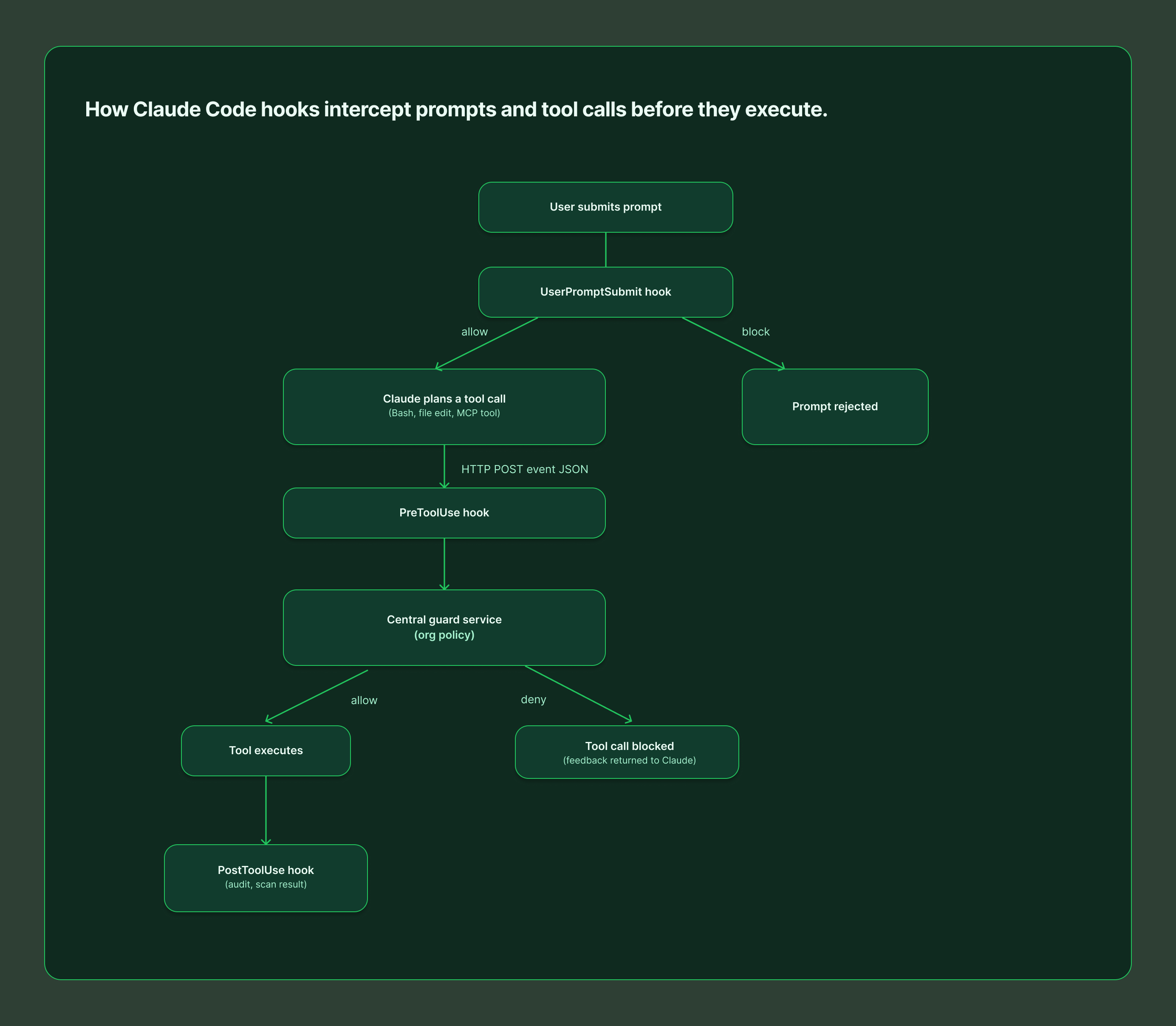
Claude Code fires lifecycle events for everything the agent does, and hooks let you intercept them: UserPromptSubmit before Claude processes a prompt, PreToolUse before any tool call executes (with the ability to block it), PostToolUse after it succeeds, plus dozens more covering permissions, subagents, and session lifecycle.
This is the only mechanism that sees a Bash command before it runs and can stop it. Hooks can execute a local script, call an MCP tool, or POST the event JSON to an HTTP endpoint – which is how centralized guard services evaluate every prompt and tool call against org policy in real time. Hooks ship as plugins, so distribution is a one-time install (or a managed-settings deployment for fleet enforcement). The trade-off: it's client-side – without managed settings, a determined user can remove the hook.
Best for: engineering organizations that need pre-execution control over commands, file edits, and MCP tool calls.
2. Anthropic Inference Hooks – server-side enforcement for Claude Enterprise
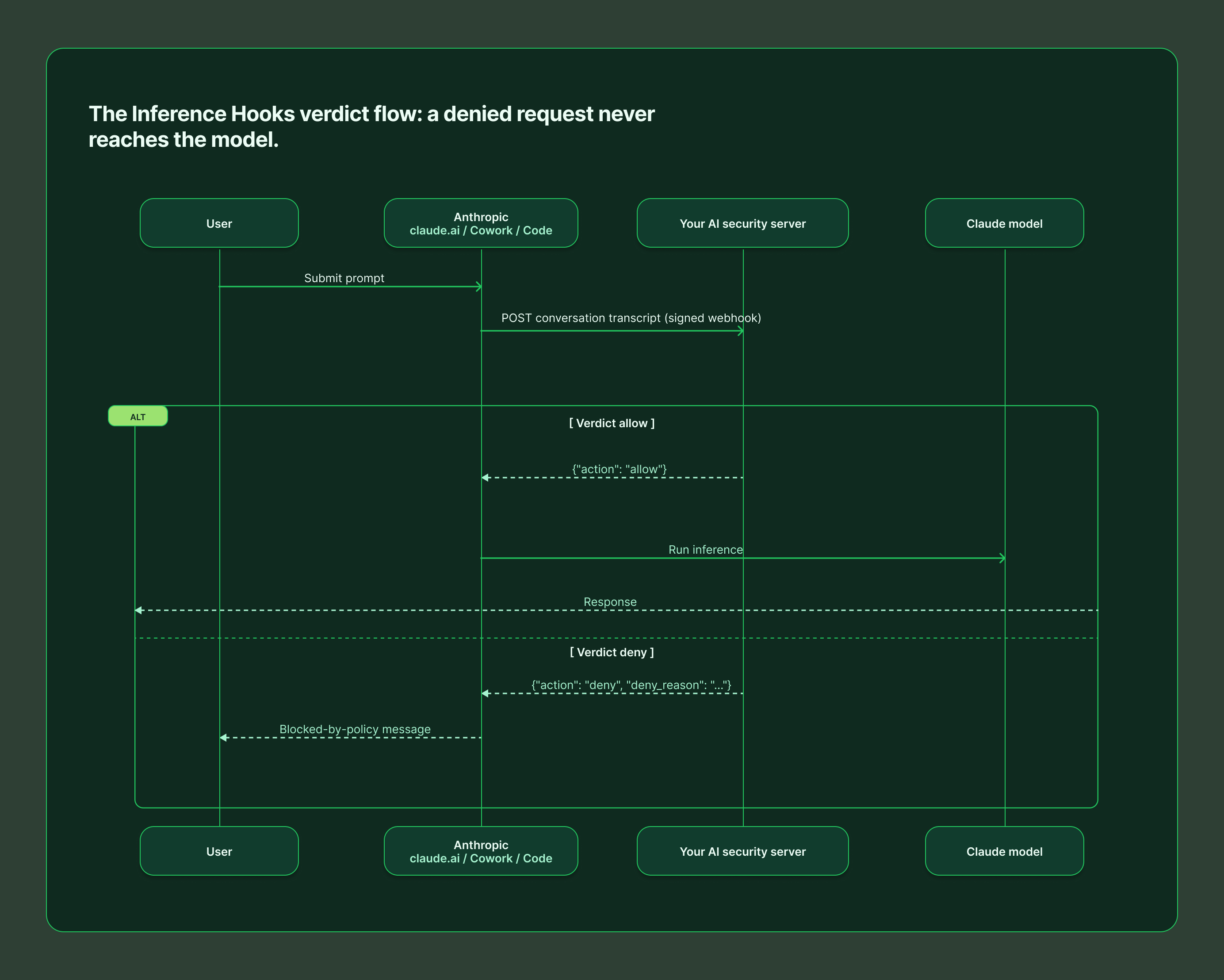
Inference Hooks (beta, Enterprise only) are the opposite deployment model: Anthropic's servers call your HTTPS endpoint before inference runs, and a denied request never reaches the model. One configuration governs claude.ai, Cowork, and Claude Code across web, desktop, and CLI – with nothing installed on user devices.
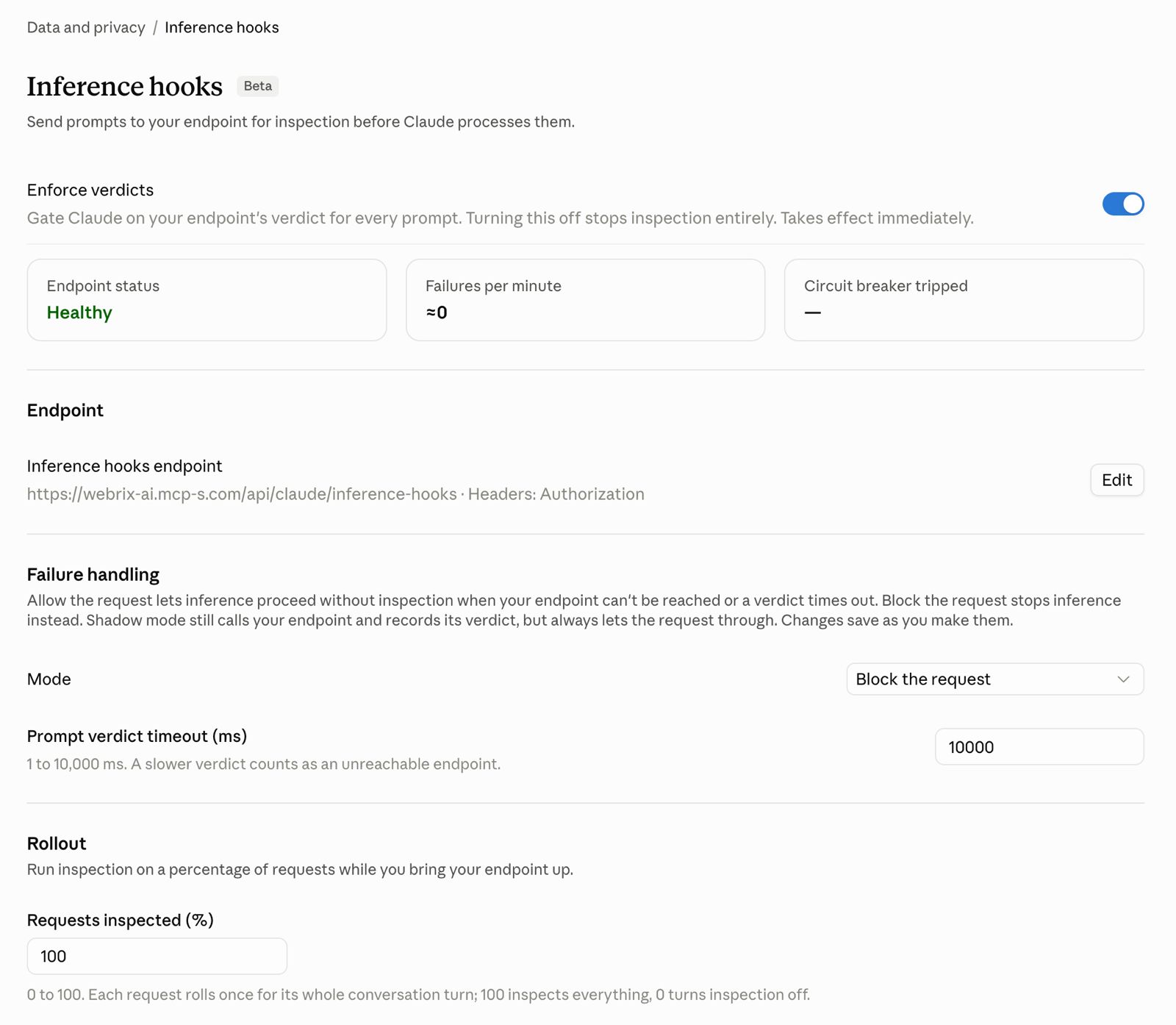
Your endpoint receives the conversation transcript, tool calls and their results, and text extracted from attachments (never raw file or image bytes, and never system prompts). It must answer within the configured timeout (5 seconds by default) with a verdict: allow, or deny with a user-facing reason. There is no redaction or rewriting – a violating prompt is blocked outright, and the denial lands in the org's Activity Feed.
Rollout is gradual by design: shadow mode observes verdicts without blocking, a rollout percentage inspects a fraction of traffic, and role exclusions exempt chosen users. You also choose failure handling – fail open or fail closed – when your endpoint is unreachable.
Best for: organizations on Claude Enterprise that want org-wide, unbypassable DLP with zero endpoint agents.
3. OpenTelemetry – the visibility layer
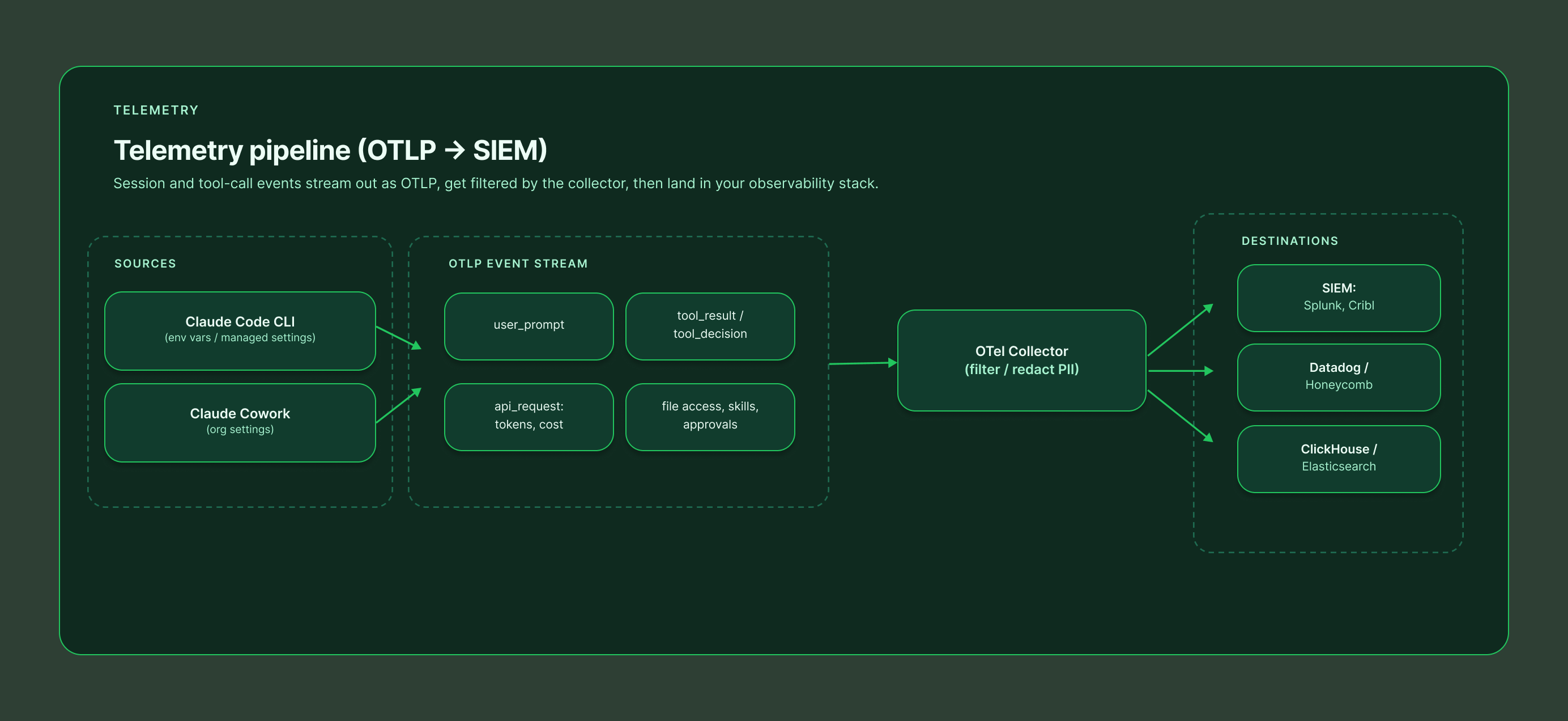
Both Claude Code and Cowork can stream structured events to any standard OTel collector, feeding the SIEM and observability stack you already run.
Claude Code exports metrics (sessions, tokens, cost) and events (user_prompt, tool_result, tool_decision, api_request, and more) via environment variables or managed settings. It is privacy-first by default: prompt content, Bash commands, and tool parameters are all redacted unless you explicitly opt in with OTEL_LOG_USER_PROMPTS, OTEL_LOG_TOOL_DETAILS, and related flags. Managed settings can lock the OTLP destination so developers cannot reroute the stream.
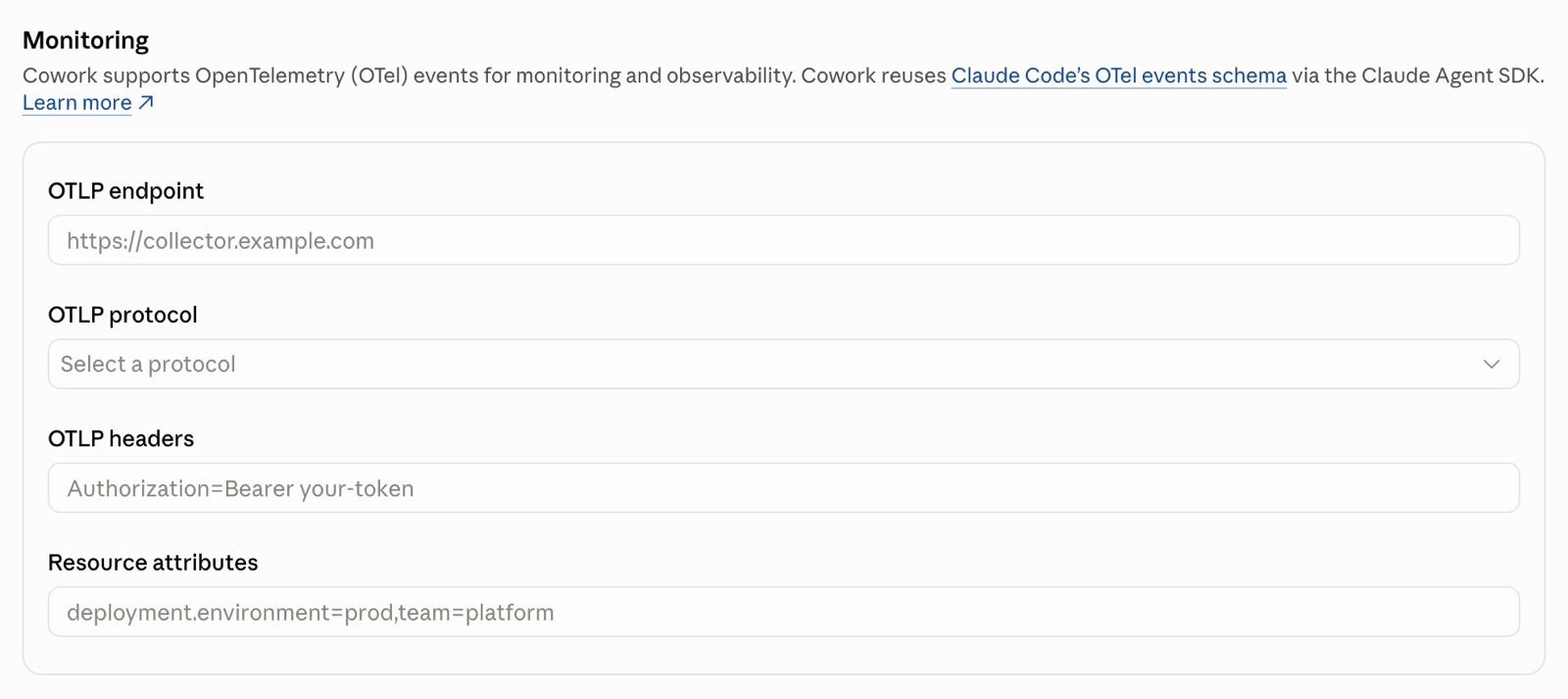
Cowork (Team and Enterprise) is configured once in organization settings and covers cloud, web, mobile, and local desktop sessions. It is more revealing by default – full prompt text, tool and MCP invocations with parameters, file access paths, skill and plugin usage, and human approval decisions all flow out of the box, correlated per prompt via a shared prompt.id. Filter or redact at your collector if policy requires it.
The critical limitation: OTel observes. It will tell you a secret was pasted into a prompt; it will not stop it.
Best for: security monitoring, incident investigation, usage and cost analytics, and alerting on policy violations after they happen.
4. Compliance API – the audit and remediation layer
The Compliance API gives Enterprise organizations programmatic, pull-based access to everything that already happened: the Activity Feed of per-event records, full chat content and attachments, projects, Cowork remote-session transcripts, and the directory of users, roles, and settings across linked organizations. Uniquely, it can also delete chats, files, and projects on demand – making it the remediation arm of a guardrail program.
Standalone Claude Console (API) organizations get the Activity Feed only, via an Admin API key. Everything runs under a 600 requests/minute rate limit per parent org.
Best for: eDiscovery, retention enforcement, SIEM ingestion, and cleaning up after an incident that a real-time layer flagged.
The three gap-fillers
5. Browser extension – guarding claude.ai without Enterprise
Inference Hooks require an Enterprise plan. For every other org, the practical way to guard claude.ai is a browser extension that scans the prompt and attached files before the submit button does anything, blocking or warning on policy violations client-side. Extensions can also watch the network actions Claude takes inside the browser.
It works on any plan and deploys per user (or fleet-wide via Chrome enterprise policy). The honest caveat: it is a device-level control. A user on an unmanaged browser or personal device walks right past it, so treat it as a strong default rather than a hard boundary.
Best for: Team and Pro/Max orgs that need claude.ai coverage today, and as a defense-in-depth layer alongside server-side controls.
6. MCP Gateway – governing what Claude does
Everything above governs the conversation. An MCP gateway governs the actions: it sits between Claude and your tools (Jira, GitHub, databases, internal APIs), so every tool call from every surface – chat, Cowork, Desktop, Claude Code – flows through one policy point.
At that choke point you can allow or block individual tools per user or group, redact sensitive fields from tool responses, enforce authentication and rate limits, and keep a complete audit trail of every action Claude took on your systems, with credentials held centrally instead of scattered across user machines. It will not see the prompt itself – that is by design. It is the complement to a conversation-layer guard, not a replacement.
Best for: any organization connecting Claude to internal systems. This is the layer that turns "Claude can access our tools" into "Claude can access our tools under policy."
7. AI Gateway – proxying the model traffic itself
An AI gateway (LLM proxy) intercepts the API traffic between the client and Anthropic, seeing the complete request and response: full prompt, conversation context, tool definitions, and completions. That enables the richest action set of any option – block, redact, rewrite, rate-limit, log, even route to a different model.
The catch is coverage. Only traffic you can repoint works: Claude Code supports gateway configuration, and your own API-based applications obviously do – but claude.ai, Cowork, and Claude Desktop talk directly to Anthropic and cannot be proxied. An AI gateway is a deep control for a narrow slice, and it brings operational weight: added latency, availability risk, and API key management.
Best for: organizations running Claude Code at scale against a central endpoint, or building their own Claude-powered applications.
What about custom harnesses and the raw API?
Everything above assumes your users sit in Anthropic's packaged surfaces. Many organizations also build their own agents – directly on the Anthropic API, on the Claude Agent SDK, or on an open-source harness. None of the guardrails in this guide apply there automatically: Inference Hooks explicitly exclude Platform (API) organizations, the managed OpenTelemetry pipelines cover only Claude Code and Cowork, and the Compliance API does not see your application's traffic.
The flip side is that you own the whole control plane. An AI gateway in front of your model endpoint gives you inspection and blocking on every request. The Claude Agent SDK exposes the same hook events as Claude Code (UserPromptSubmit, PreToolUse, and the rest), so the guard service you built for developer laptops can enforce the same policy inside your custom harness. Tool access still belongs behind an MCP gateway, and telemetry is yours to emit. In short: custom harnesses get no guardrails for free, but they are also the one place where every layer is fully under your control.
Putting it together: a layered reference architecture
No single option covers every surface with every action, so mature deployments stack them:
1. Enforce the conversation layer – Inference Hooks if you are on Enterprise (all surfaces, server-side); Claude Code hooks plus a browser extension if you are not.
2. Enforce the action layer – an MCP gateway in front of every tool Claude can touch, regardless of plan.
3. Watch everything – OpenTelemetry from Claude Code and Cowork into your SIEM for detection, alerting, and cost visibility.
4. Keep the receipts – the Compliance API for audit, retrieval, and deletion when something slips through.
One platform for every layer: Willow
If stitching five mechanisms together sounds like a lot, that is the problem Willow was built to solve. Willow implements every layer in this guide as a single product with one policy engine and one audit trail:
• Guard hooks for Claude Code, Cursor, and Codex – a plugin that evaluates every prompt and tool call against your organization's runtime guards before it executes.
• A ready-made Inference Hooks endpoint – Enterprise orgs paste one URL and an org token into claude.ai and get server-side enforcement across chat, Cowork, and Claude Code.
• A browser Prompt Guard that scans prompts and files submitted to claude.ai, ChatGPT, and Gemini, plus a Chrome extension guard for the network actions Claude takes in the browser.
• An MCP gateway with per-tool allow/block policies, centralized credentials, and full audit of every action AI agents take on your systems.
• Shadow-AI scanning and coverage tracking, so you can see which surfaces are actively protected and which employees are using AI tools you have not approved yet.
Whatever mix your plan allows – Inference Hooks on Enterprise, hooks and extensions everywhere else — Willow deploys and manages it from one dashboard, with a single set of guards enforced identically on every surface. Learn more at withwillow.ai or explore the docs at docs.withwillow.ai.
Sources: Anthropic Inference Hooks and Compliance API documentation (platform.claude.com), Claude Code plugins and monitoring references (code.claude.com), and the Cowork OpenTelemetry guide (support.claude.com).
Willow Integrates with Claude's Compliance API: One Control Plane for Every Agent.
Willow now integrates with Claude's Compliance API. The integration brings Claude usage on the Claude Platform, and conversation content on Claude Enterprise, into the same control plane that already governs the rest of your agents: endpoint agents, SaaS agents, homegrown automations, and the MCP servers, skills, and tools they run on.
Claude is already in production across enterprise teams, drafting legal documents, building financial models, moving real work through real systems. What most security teams cannot see is the specific data moving through those conversations. That blind spot is exactly what this integration closes.
One policy layer, every agent
Willow is the Agentic Access Platform, the control plane for AI agents in the enterprise. It gives every agent a real identity inherited from your existing provider (Okta, Entra ID, JumpCloud), scopes what each agent can do inside every tool, and records every action in an audit trail tied to a named person.
Until now, activity on the Claude Platform sat outside that picture. The Compliance API integration pulls it in. Claude usage is governed by the same policies, surfaced in the same console, and investigated through the same workflow as every other agent in your environment. One policy layer, applied everywhere agents actually operate.
The integration connects at the organizational level on the Claude Platform. It does not require rearchitecting how employees work, routing traffic through a proxy, or installing software on end-user machines. It runs in the background to give you a complete audit trail, without changing the experience for the people already using Claude.
What is the Compliance API?
Claude's Compliance API gives authorized integrations programmatic access to activity logs on the Claude Platform. It exposes chat sessions, messages, users, roles, and organizational structure through a set of endpoints that integrations poll on a defined schedule.
Willow connects to the Compliance API at the organizational level and polls for new activity, pulling sessions and messages and mapping them to individual user identities through your identity provider. Security teams can see who is active, which sessions are running, and what content is moving through those conversations, with no friction added to how people already use Claude.
The integration applies to Anthropic-hosted deployments. Conversation content access through the Compliance API is available on Claude Enterprise plans only.
What Willow does with the data
Every Claude session that comes through the integration runs through Willow's guardrails, the same runtime checks that govern the rest of your agent estate. That means:
- Sensitive data detection. PII, credentials, secrets, and regulated records are flagged as they move through sessions.
- Prompt injection detection. Direct and indirect attempts are surfaced, so a poisoned document or message does not quietly redirect an agent.
- Full audit trail. Every session is captured in the Logbook, whether or not a detection fires, so you have a defensible evidence trail of what happened over weeks, months, or quarters.
This is more than observability. Claude activity is evaluated against the same centrally defined policy Willow applies across every other control point, and every record is tied back to a real employee through your identity provider. When a session contains a violation, Willow surfaces it with full context: the prompt, the response, the user identity, the timestamp, and a risk classification. Security teams can investigate the session, filter the environment for similar patterns, and export the evidence for compliance reporting. If an investigation needs to reconstruct what a specific person shared, that history is already mapped to their identity.
Part of full-ecosystem coverage
Willow already governs agents across the enterprise: agent identity from your IdP, app-aware permissions that define what an agent can do inside each tool, an inline gateway for agent-to-tool traffic, and shadow-AI discovery at the endpoint through Willow for Chrome. This integration removes one of the last blind spots. Claude Platform usage is no longer invisible in an otherwise governed environment.
Discovery, governance, and runtime detection now extend across the Claude product surface for Anthropic-hosted deployments, inside the same platform that runs in production at multiple enterprise around the world including Wix, where Willow governs roughly 600 tools across about 5,000 weekly active users and more than 1M governed tool calls a week.
Why this matters now
Anthropic is shipping new capabilities faster than most security programs can absorb. Each one is genuinely useful, and each one raises the same questions your existing tools were not built to answer. Who initiated the task? What did the agent access? Did any interaction cross a policy line?
Those questions are answerable, but only if the instrumentation and the audit trail are in place before a capability is widely adopted, not after the first incident review. Bringing Claude Platform activity into your control plane now is how you stay ahead of that curve instead of reconstructing it later.
Get started
The integration is available today for Claude Enterprise. Connect Claude to the same control plane that governs the rest of your agents, and give your security team the visibility and audit trail to say yes to Claude at scale.
- See the Claude x Willow integration setup guide
- Get started with Claude Compliance API integrations
- Book a demo.
How to Deploy AI Background Agents in the Enterprise: A Framework
The first wave of enterprise AI helped people work faster. The next wave takes the work off their plate entirely. That shift has a name: background agents. And deploying them well is less about picking a model than about running a disciplined operating practice.
This post covers the essentials: what background agents are, why mid-market teams are positioned to win with them, and the four-step framework for putting them into production safely. The full white paper goes deeper, with worked examples across six departments, a per-agent design template, and a complete governance checklist. Grab it at the end.
What is a background agent?
A background agent is an AI system that performs work autonomously behind the scenes, on a schedule or in response to an event, without a user prompting each task. A chat assistant waits for a person and supports them during a task. A background agent owns the workflow and runs it end to end.
The distinction matters because it changes what the system can do, and what can go wrong. A chat assistant drafts a message. A background agent reads Slack, email, and your ticketing system at 7:30 AM, then posts a team summary with risks and follow-ups before anyone logs on. One helps a person do the work. The other does the work for them, or does work that otherwise would never get done.
It is not RPA either. Robotic process automation replays deterministic clicks. A background agent reasons and generalizes across systems, which makes it far more capable and far more important to govern.
Why background agents matter now
Inside every organization there are two kinds of work an agent can take on. The first is workflow replacement: recurring work employees already do, like weekly reporting, meeting prep, and shift handoffs. The business case is easy because the baseline is visible in headcount and time.
The second is workflow creation: valuable work that never gets done because the manual cost is too high. Daily cross-system briefs, per-customer usage summaries, nightly pipeline-hygiene passes. As the cost per run collapses, this work becomes worth doing for the first time, and it is usually where the most differentiated value lives.
Mid-market organizations are especially well positioned. They have enough structure to make agent design meaningful, and enough speed to iterate faster than large enterprises.
The four-step framework, in brief
Deploying background agents is a loop, not a one-time project. Four steps move you from scattered experiments to production:
- Define the use case. Pick workflows that are repetitive and already done by hand, or valuable and currently skipped. The best candidates are well-defined, repeatable, and touch systems you already control.
- Design the agent. Specify three things: the trigger that starts it, the workflow logic it follows, and the exact data it can read and the actions it can take. This is a formal design artifact, not a prompt you tune ad hoc.
- Choose the implementation approach. Managed platform, orchestration framework, custom build, or RPA-assisted. Let the use case and governance needs drive the choice, not the other way around.
- Iterate in production. Instrument the deployment so you refine on evidence, not anecdote, and catch the predictable failure modes: shallow output, wrong triggers, broad permissions, and drift.
The white paper breaks each step into screening questions, a trigger taxonomy, a copy-ready data-and-actions matrix, and a worked example built end to end.
Where it pays off, and where it breaks
Every function has candidates: pre-call briefs and pipeline hygiene in sales, PR review and release notes in engineering, month-end narratives in operations, candidate summaries in HR, shift handoffs in support, cash briefs in finance. Most teams can safely start with two or three.
The hard part shows up when agents move from one demo to dozens in production. The question stops being "does the agent work?" and becomes "whose identity is this agent acting under, what is it allowed to do inside each tool, and can I prove it?" A background agent running on a personal API key has no tie back to a named person and no automatic off-switch when that person leaves. That is the gap that surfaces on an audit, and it is why governance has to be a design requirement, not an afterthought.
This is the layer Willow governs. Every agent inherits a real employee's identity from your existing provider (Okta, Entra ID, JumpCloud), gets permissions scoped to what it can do inside each tool, not just which tools it can reach, and is deprovisioned automatically when the employee leaves. It is what lets security say yes to agents at scale. At Wix, Willow governs roughly 600 tools across about 5,000 weekly active users, processing more than 300,000 governed tool calls a week.
Get the full framework
The white paper, Deploying Autonomous Agents in the Enterprise, is the complete playbook: the full four-step framework with screening questions and design templates, department-level examples across sales, support, engineering, operations, HR, and finance, a worked sales pre-call brief agent, and a governance checklist you can use as an onboarding template for every new agent.
Download the white paper (PDF) to get the framework your team can put into production.
.png)
Inside Claude Tag: How @Claude Actually Works, and Why Identity Is the Hard Part
Anthropic just shipped a version of Claude that lives in your Slack and works like a coworker. The interesting story isn’t the chat box. It’s how the agent gets an identity, how it touches your tools, and what could go wrong. Here’s the whole thing in plain language.
~12 min read | For builders, PMs & security-minded readers | No deep expertise required
01 · A new teammate, not a new chatbot
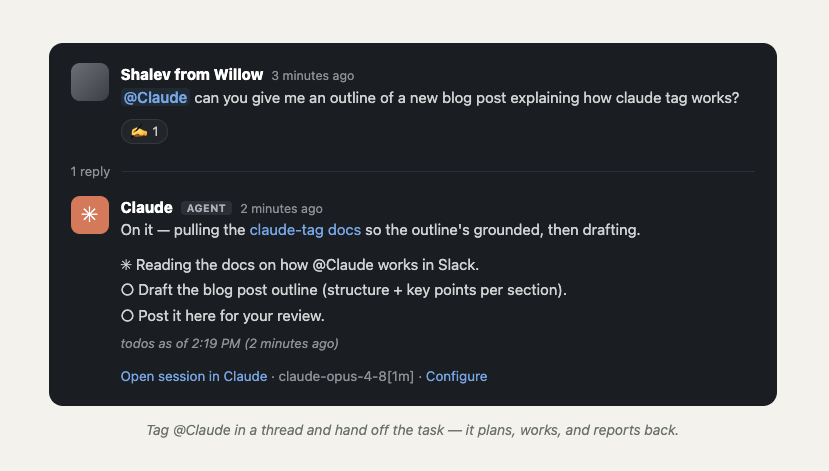
On June 23, 2026, Anthropic introduced Claude Tag: a way to bring Claude into the places your team already works, starting with Slack. You grant Claude access to selected channels, connect it to the tools, data, and codebases you choose, and then anyone in the channel can type @Claude and hand off a task. Claude breaks the request into steps, works through them with the tools it has, and replies in a thread when it’s done.
Anthropic is blunt about how central this has become internally: they say 65% of their product team’s code is now created by their in-house version of Claude Tag, and that tagging @Claude is one of the main ways work gets done. Not just for engineering, but for chasing product metrics, working support tickets, and root-causing bugs.
So how is this different from Cursor’s background agent from a year ago?
It’s a fair question. In June 2025, Cursor shipped “Background Agents in Slack”. You mention @Cursor in a thread, it reads the conversation, runs remotely in a secure environment, and opens a pull request in GitHub. On the surface that sounds identical: tag a bot in Slack, get work back. But the two solve different problems.
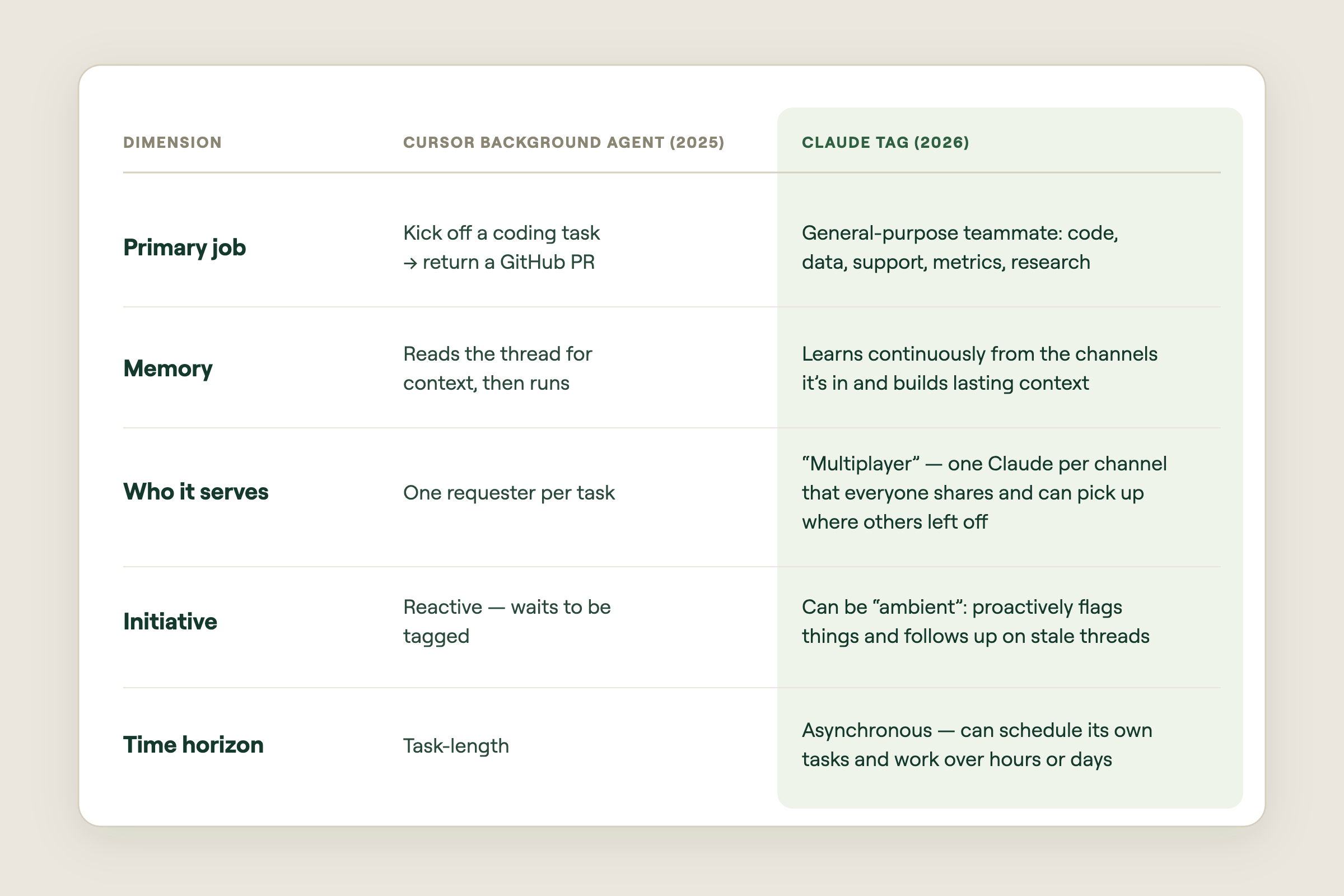
The short version: Cursor put a coding agent where your team chats. Claude Tag is trying to put a colleague there, one with memory, initiative, and its own to-do list. And the moment you have a colleague that acts on its own across many tools, you hit a problem Cursor’s model mostly sidesteps: who is this agent, and whose permissions does it use?
02 · Agent identity: Claude gets hired as an employee
Today, when you connect Claude (or most AI assistants) to a tool through a connector, the assistant acts as you. You log into Google Drive, you grant access, and the model reads and writes using your permissions and your name. That works fine for one person chatting with one assistant. It falls apart the moment Claude sits in a shared channel. As Anthropic explains in their agent identity write-up, “act as the user” breaks for two reasons:
- It's multiplayer. If three engineers and a PM are all in a channel, whose permissions should Claude use? There's no single right answer.
- It's autonomous. The agent schedules its own work and acts hours after the person who asked has logged off. Borrowing a human's live session doesn't fit a worker that runs on its own.
Anthropic’s answer is agent identity: instead of borrowing a human’s credentials, Claude gets its own accounts, provisioned by an admin and tied to the workspace. It posts in Slack as the Claude app, opens pull requests as the Claude GitHub App, and queries your data warehouse under its own service account. Claude acts as itself, like a new employee with their own logins, not as any specific human.
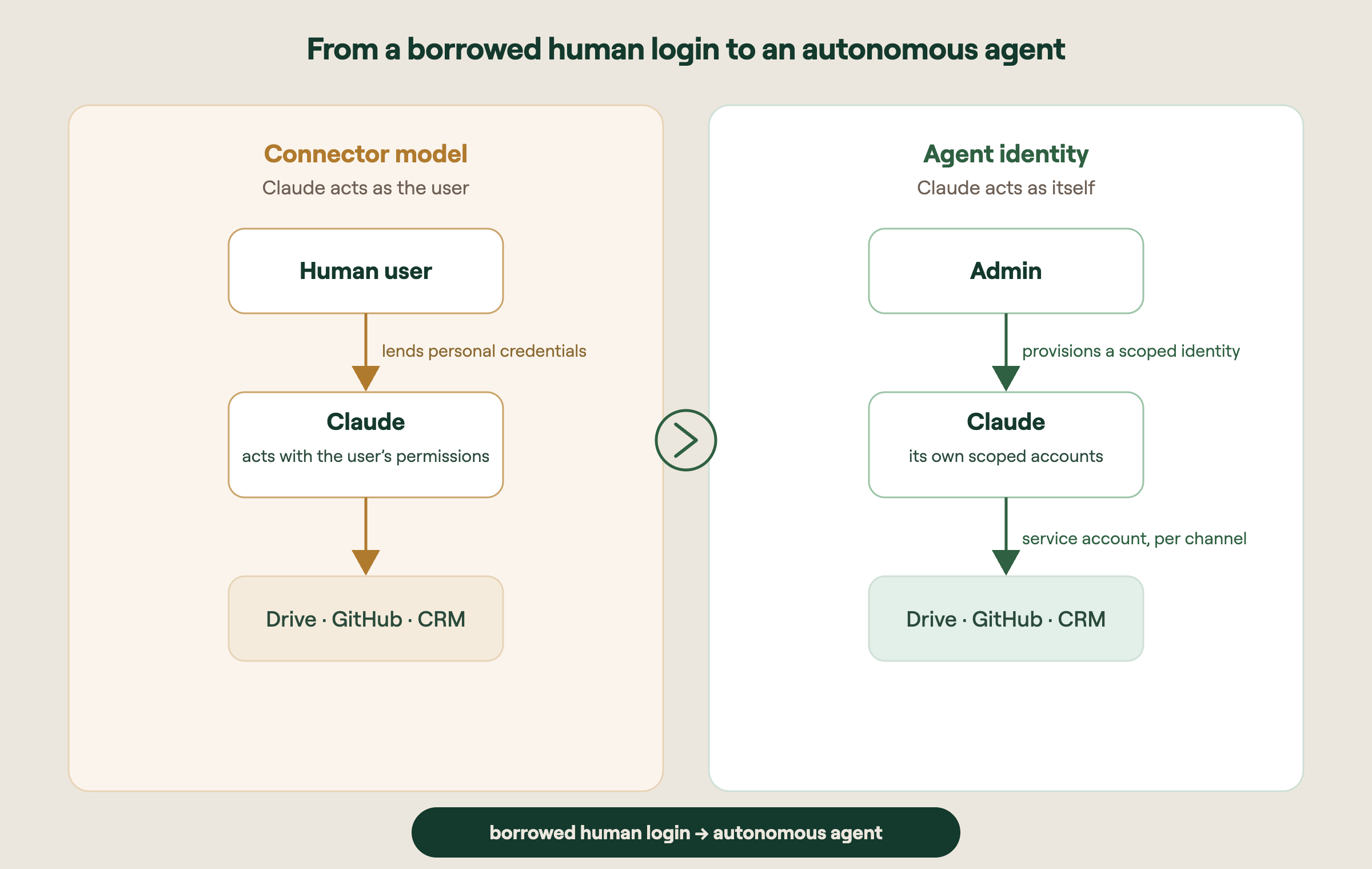
How this differs from how connectors work today
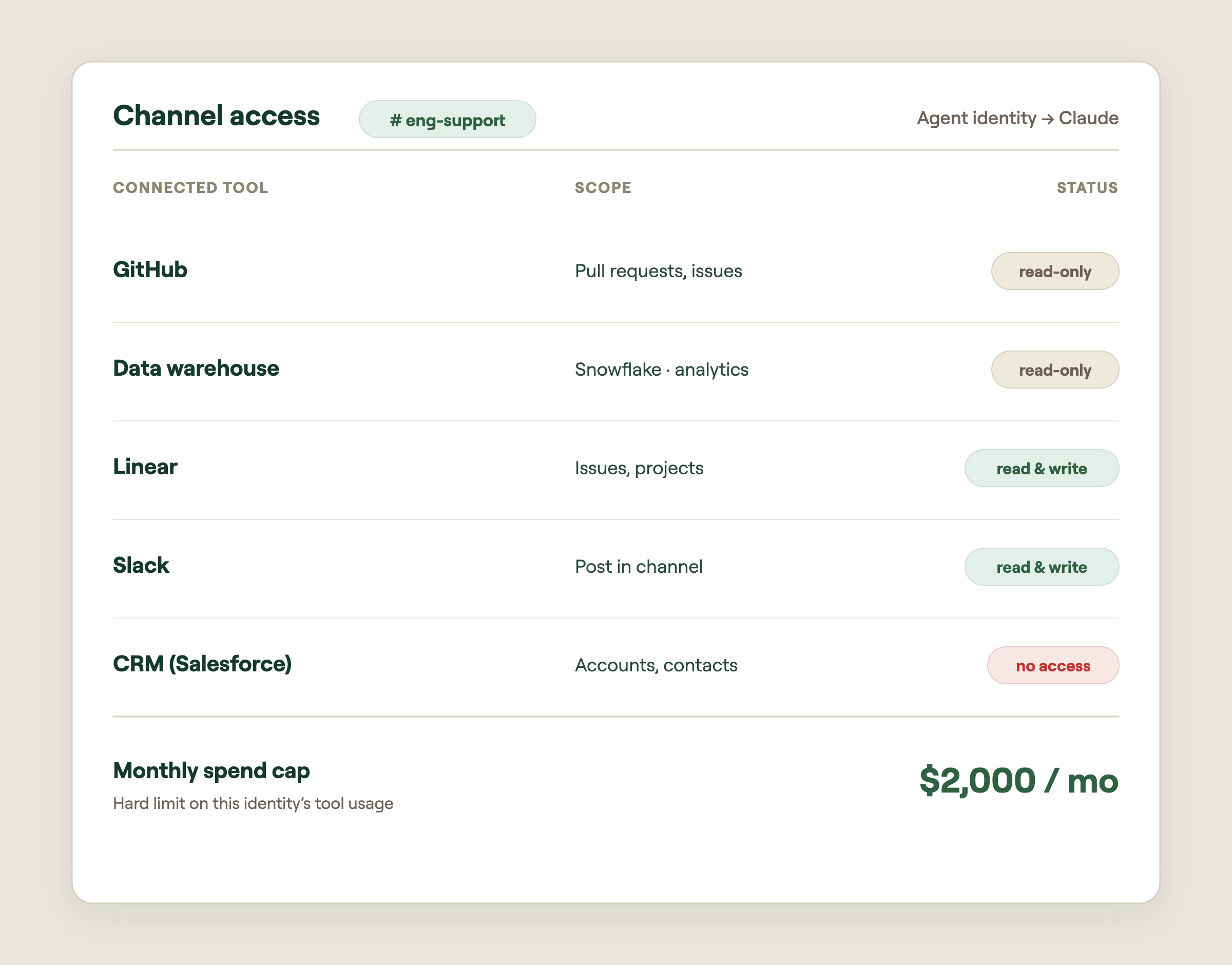
With a normal connector, permissions follow the person. With agent identity, permissions follow the channel. An admin defines a baseline identity at the workspace level, and each channel inherits it, then overrides where it makes sense. Crucially, a person who doesn’t personally have repo access can still ask Claude to read that repo, if the channel’s profile grants Claude that permission. That’s a real departure from traditional per-user access control lists, and it’s deliberate.
Identities are also walled off from each other. Claude Tag creates a distinct identity for each private channel; public channels share a workspace-level identity. What Claude learns in a private legal channel never leaks into engineering. Revoking the identity cuts Claude’s access everywhere that identity was used. One switch, not an audit of dozens of accounts.
The part that surprises people: the model never sees the token
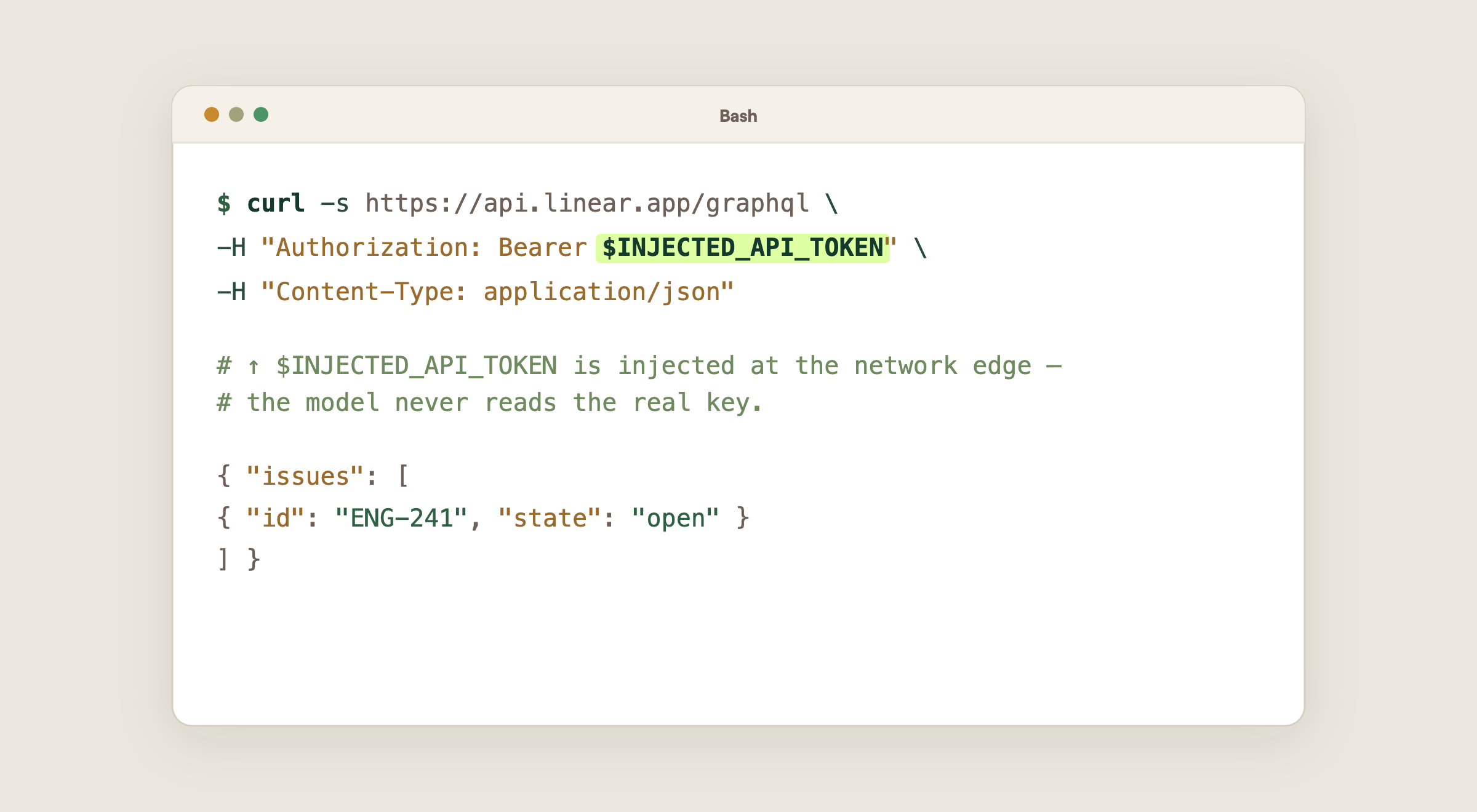
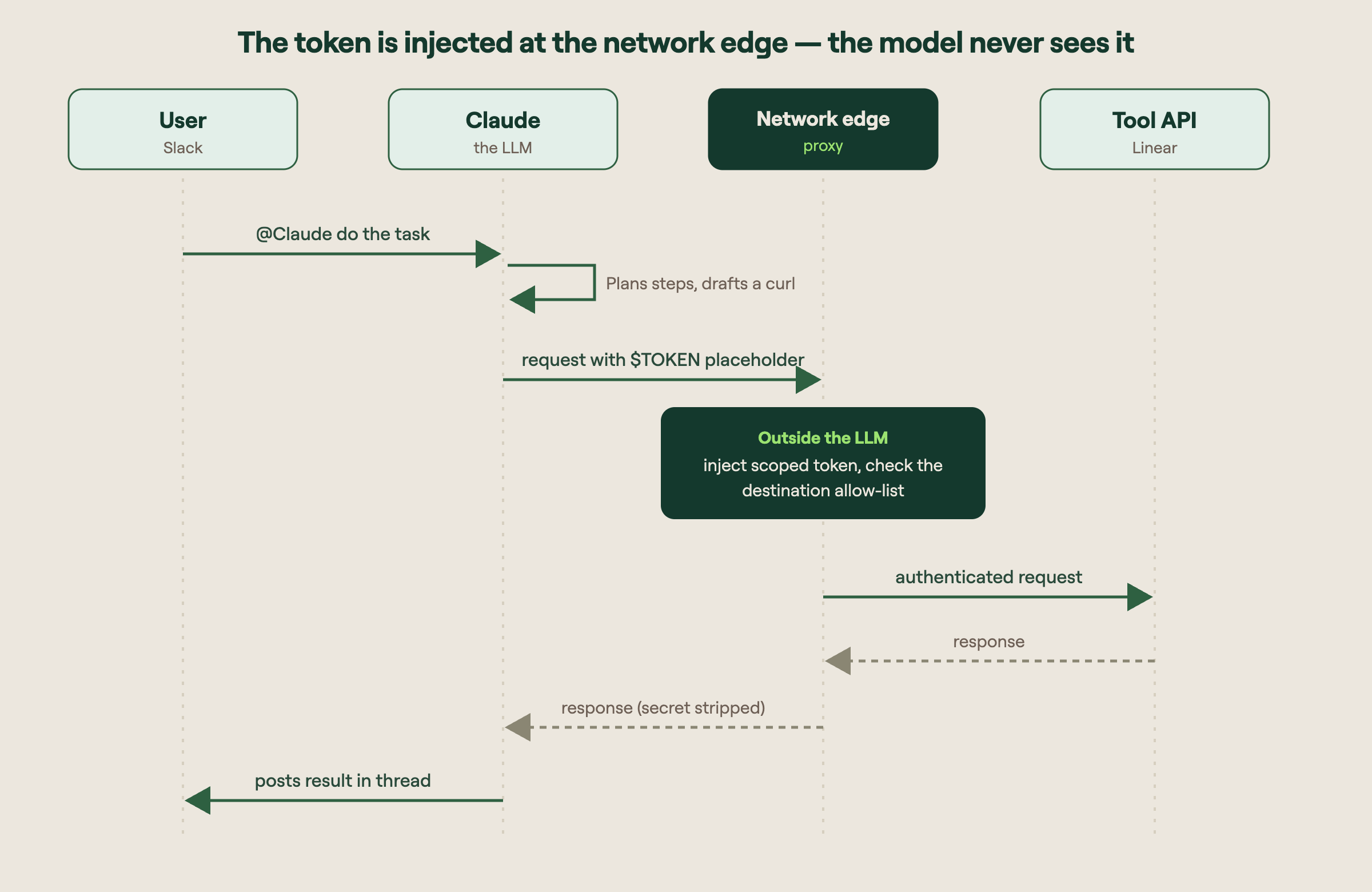
When Claude needs to call a tool, it doesn’t hold the secret credential in its “head.” When an admin adds a connection to a channel, the credential is stored separately, mapped to that channel’s identity, and injected at the network boundary at request time. In practice Claude writes a request with a placeholder where the token goes, and the real token gets attached outside the language model, as the request leaves the sandbox.
03 · Talking to tools over APIs, not MCP
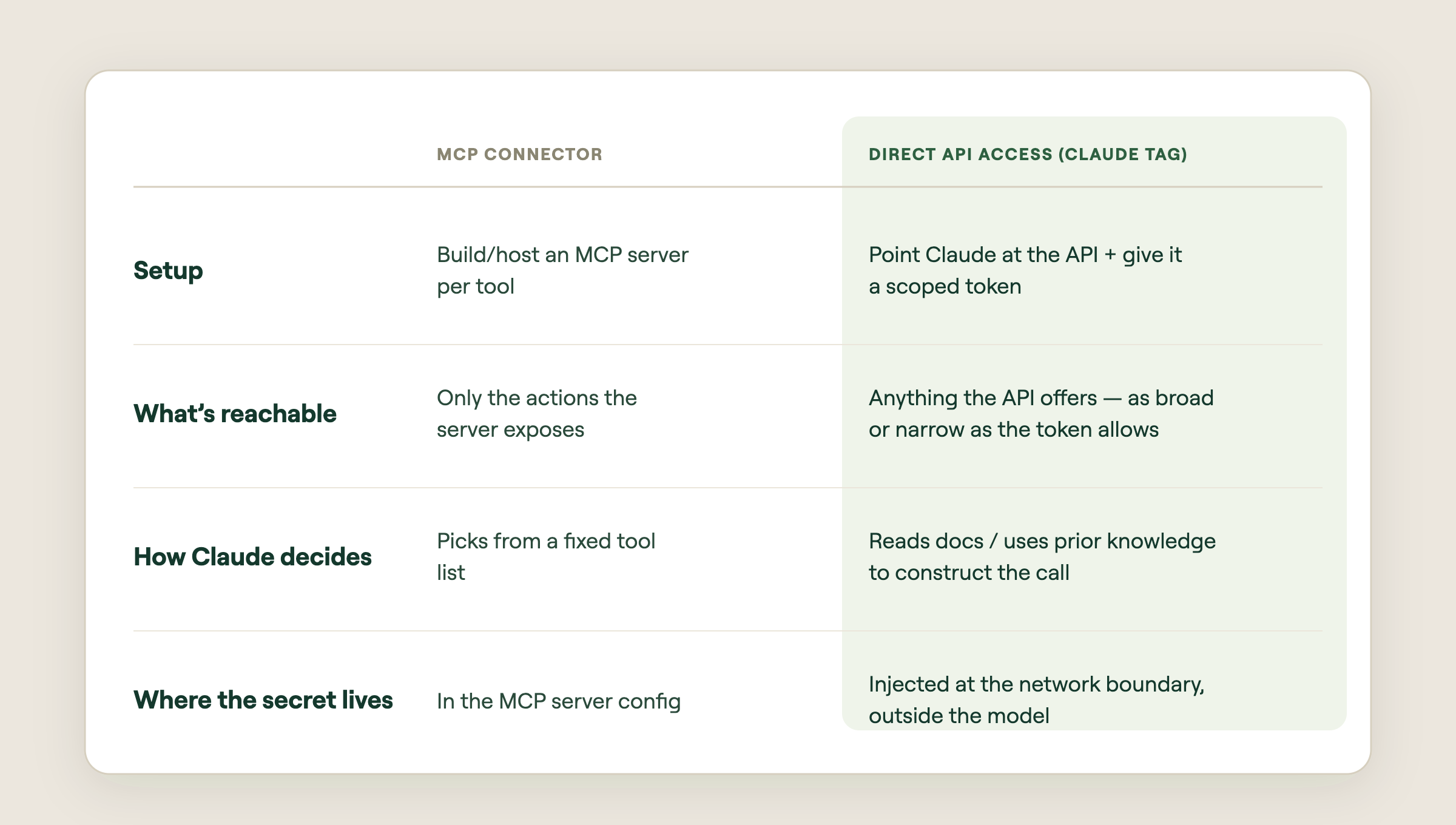
MCP (the Model Context Protocol) is a standard way to expose tools to a model. It’s great, but it adds a layer: someone has to build, host, and maintain an MCP server for each tool, and the model is limited to whatever actions that server exposes. Claude Tag leans on a simpler idea: let Claude call the tool’s own API directly, usually with plain HTTP requests it composes itself. Claude already “knows” how thousands of public APIs work and can read API docs on the fly, then the token is injected at the edge.
Why “scary” and “powerful” are the same sentence here
Direct API access is enormously flexible, but flexibility cuts both ways. The same token that lets Claude read issues can often delete them, if the token’s scope allows it. So the real control surface isn’t the prompt. It’s the token’s permissions. Give Claude a read-only key and no amount of clever prompting (or prompt injection) lets it write. The boundary lives in infrastructure, not in the model’s good behavior.
The mental model: Don’t think “what should I tell Claude not to do?” Think “what is this token physically allowed to do?” The token is the fence. The prompt is just instructions inside the fence.
04 · Where it can go wrong, and how to start safely
An autonomous teammate with API access and its own logins is genuinely useful. It’s also a new class of risk. The failure modes worth naming before you turn it on:
- Destructive endpoints. A token scoped for convenience may also expose DELETE and other write actions. An agent that “helpfully” cleans up could remove records you wanted. Scope tokens to read-only wherever the job allows it.
- Access leakage across people. Because access follows the channel, not the person, someone without direct access to a system can ask Claude to act on it. A channel’s membership effectively defines who can reach that data.
- Tokens or secrets ending up back in the conversation. If a response, error message, or log echoes a credential back into the session and it isn’t scrubbed, the secret can persist in the transcript and memory.
- Over-broad data exposure. Connect a data source to a public or shared channel and you’ve effectively shared it with everyone who can tag Claude there, and with Claude’s memory.
A starter checklist
Anthropic’s own advice is to start with a small baseline, read the audit trail, and widen access one deliberate grant at a time. Concretely:
- Use specific Slack channels. Start with a few, ideally private ones with known membership, and expand from there.
- Connect only data that's safe for the whole channel. Treat anything you wire up as visible to every person who can tag Claude there.
- Use scoped access. Issue read-only tokens by default; grant write or delete only where the work truly needs it.
- Add safety instructions. Pair the technical limits with explicit standing instructions — belt and suspenders, with the token as the real belt.
- Watch the audit log. Review what Claude did before you widen scope.
05 · Willow: agent identity you can control.
Everything above points to the same conclusion: the agent is only as safe as the identity and the boundary around it. That’s exactly the layer the Willow API Proxy is built for. Instead of hoping each tool’s token is scoped correctly and trusting that secrets never leak into the model, Willow sits between your agents and your tools as the control plane for agent identity.
- Create an identity for each agent. Every agent gets its own provisioned identity – a real "employee," not a borrowed human account – so its actions are attributable and revocable.
- Apply the same policies you already use for MCPs and CLIs. Reuse your existing access rules instead of inventing a parallel permission system for agents.
- Capability-by-API point. Define exactly which API operations are allowed, not just token scope, with risk-rated API sets for 80+ common connectors
- Guardrails on every call. Each request is inspected in real time for the risks that actually matter with autonomous agents: prompt injection (so a poisoned page or message can't hijack the agent), secrets and tokens (so credentials never leak into prompts, responses, or memory), and PII (so sensitive personal data is caught before it goes somewhere it shouldn't).
- Full audit logs. Because the agent has its own identity, every call is recorded under that machine identity – so you can reconstruct exactly what the agent did, when, and against which system.
- A simple kill switch. When something looks wrong, cut the agent's access instantly – one switch, everywhere.
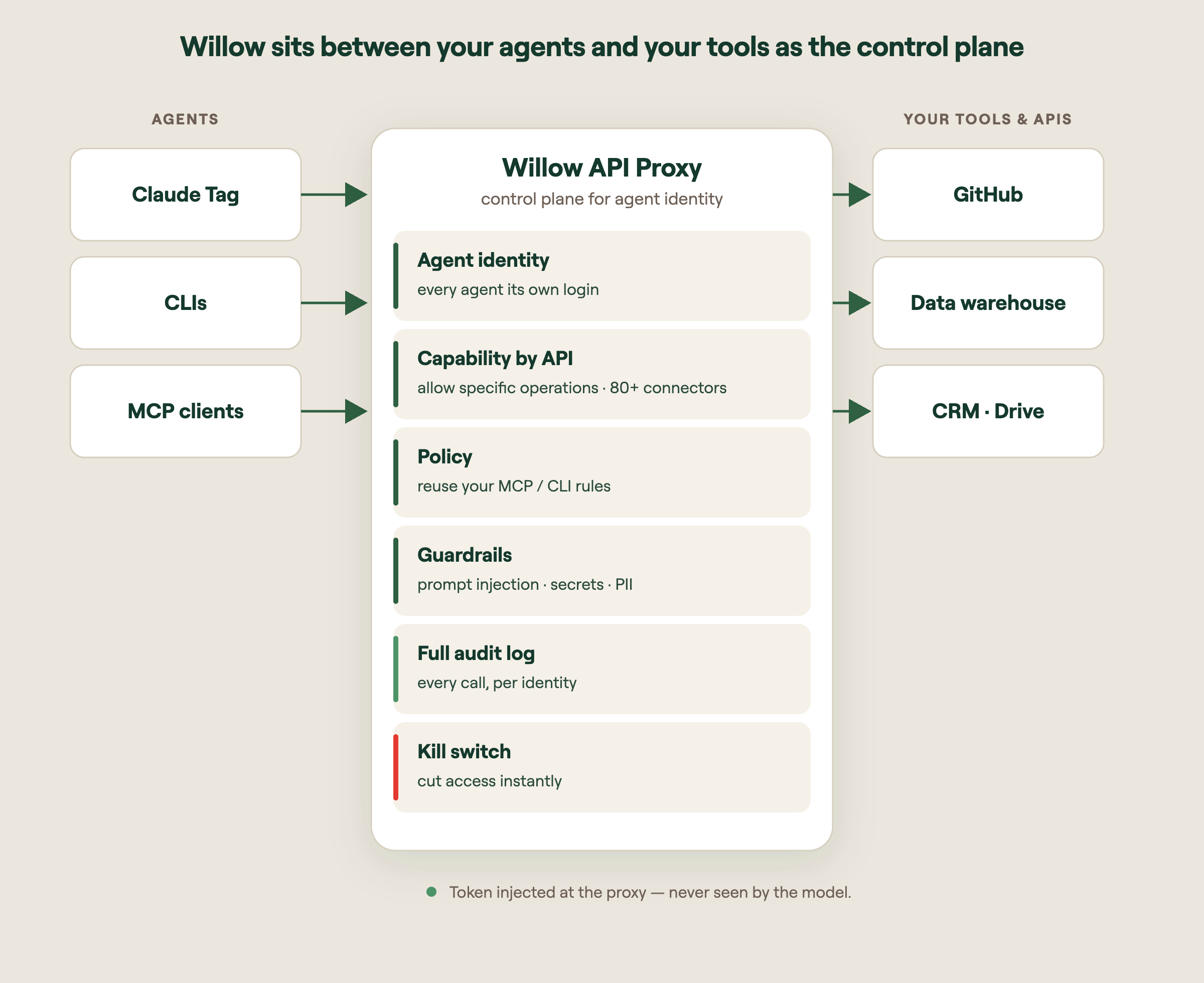
Why this fits the agent-identity era: Claude Tag moves the security question from “what can this user do?” to “what can this agent do in this compartment?” The Willow API Proxy is where you answer that question, and enforce it on every single call, with the token never exposed to the model.
The takeaway: Claude Tag makes a genuinely new kind of teammate possible. Autonomous, multiplayer, with its own identity. The companies that get the most from it will be the ones who treat that identity as something to govern, not just enable.
Sources: Introducing Claude Tag (Anthropic, Jun 23 2026); Agent identity: a new access model (Claude, Jun 24 2026); Background Agents in Slack (Cursor, Jun 12 2025).
What Is Shadow AI? Risks, Examples, and How to Govern It
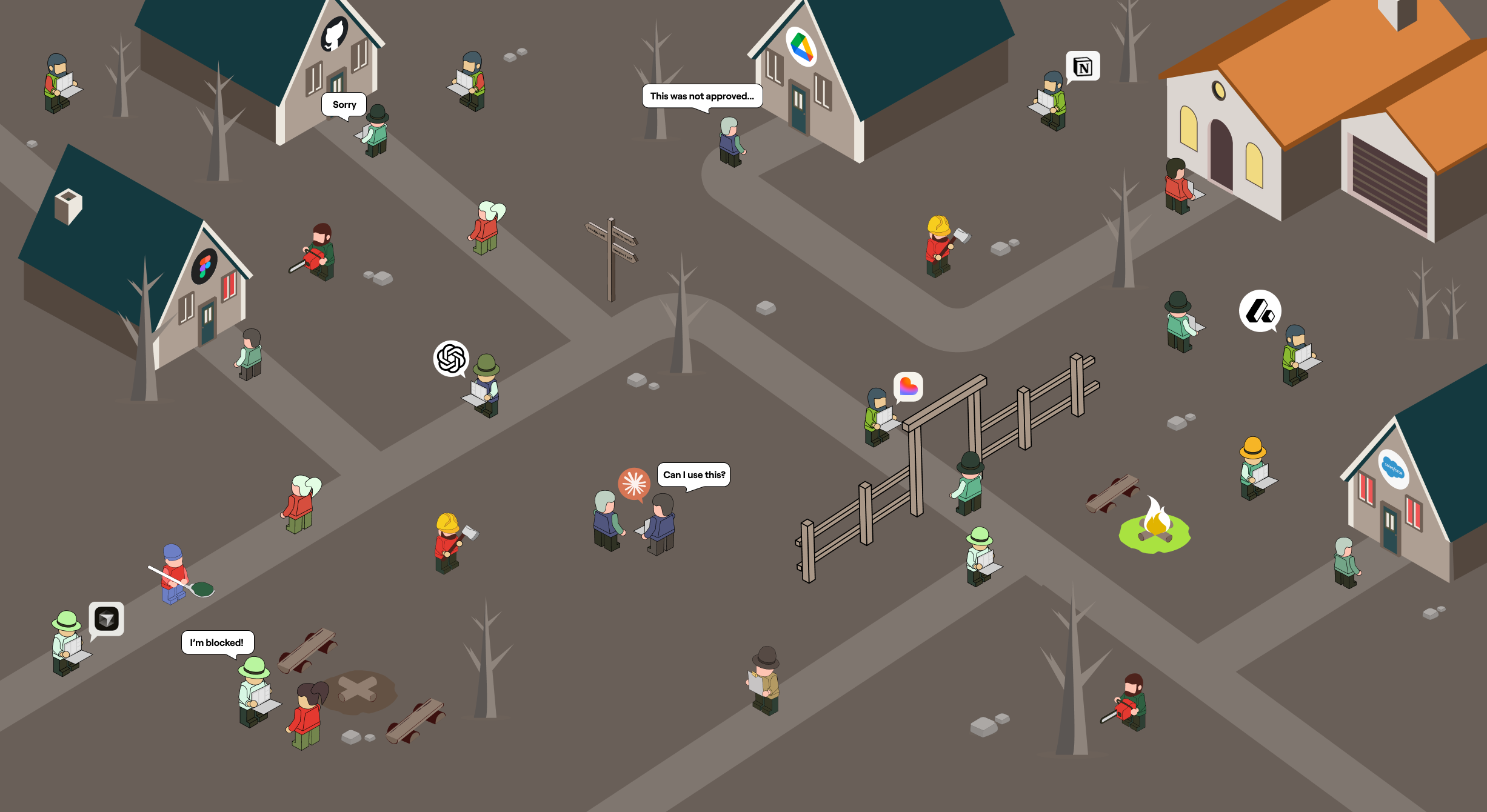
Shadow AI is the use of AI tools, agents, and connections inside an organization without the knowledge, review, or approval of IT and security. It is the AI your security team cannot see: the personal ChatGPT account wired into company data, the agent a developer spun up last week, the unmanaged MCP server quietly connecting an AI assistant to your production systems.
It is also already inside almost every enterprise. Generative AI adoption by employees climbed to 96% in 2024, and more than a third of employees admit to sharing sensitive work information with AI tools without permission (IBM / Infosecurity Magazine, 2024). The tools moved faster than the policies. This guide explains what shadow AI is, why it spreads, the risks it creates, and how to get it back under control without killing the productivity people are chasing.
What is shadow AI, exactly?
Shadow AI covers any AI usage that bypasses official oversight. That includes:
- Employees using unapproved AI apps like ChatGPT, Claude, Gemini, or DeepSeek for work tasks.
- Personal AI accounts connected to company data and SaaS tools.
- AI agents and automations deployed by individual teams without security review.
- Unmanaged MCP servers and plugins that connect AI assistants to internal systems.
- Vibe-coded apps and scripts shipped by non-engineers using AI coding tools.
The common thread is not the tool. It is the absence of governance. Nobody scoped what the AI can access, nobody is logging what it does, and nobody approved the connection to sensitive data.
Shadow IT vs. shadow AI vs. shadow agents
Shadow AI is the next chapter of a familiar story, and the chapters keep escalating.
Shadow IT was unapproved software and hardware: personal cloud storage, an unsanctioned project tool, a SaaS app bought on a credit card. The risk was data sitting somewhere IT did not control.
Shadow AI narrows to AI-specific tools. The risk grows, because employees do not just store data in these tools, they feed sensitive information into models whose training, retention, and output behavior the company never vetted.
Shadow agents are the 2026 escalation, and the most serious one. An agent does not just read data. It takes actions. It calls APIs, writes to databases, sends emails, and triggers workflows using real credentials. A shadow agent is an unmanaged identity with hands, operating inside your environment with nobody watching what it touches.
Each step adds capability, and capability is exactly what makes the exposure worse.
Why shadow AI spreads
Shadow AI is not a discipline problem. It is a math problem. The upside is immediate and personal, and the friction to do it the official way is high.
Employees reach for ungoverned AI because it makes them faster. They automate the boring parts of their job, draft in seconds, and solve problems in real time instead of waiting. When the approved path means a multi-week IT ticket and the unapproved path means pasting into a browser tab, people choose speed. Most are not trying to create risk. They are trying to hit a deadline.
The tools make it effortless. Almost every capable AI app is one signup away, no install, no procurement, no approval. The same accessibility that drives adoption is what makes shadow AI invisible. Security never gets a signal that the connection happened.
The real risks of shadow AI
The productivity gains are real. So is the exposure, and it shows up in four ways.
Data leakage
The most immediate risk is sensitive data walking out the door. An employee pastes customer records, source code, or a confidential contract into a model the company never vetted, and that data is now outside your control. With agents and connected accounts, the leak does not even need a human in the loop. An over-permissioned agent can pull from systems it should never have touched.
Compliance exposure
Regulated industries cannot afford ungoverned data flows. GDPR penalties alone reach up to 4% of global annual revenue, and newer regimes like the EU AI Act are adding obligations on high-risk AI use through 2026. Shadow AI means data crossing boundaries with no audit trail to prove what happened, which is the opposite of what every auditor wants to see.
Security vulnerabilities
Ungoverned AI expands your attack surface in ways traditional controls miss. Unmanaged MCP servers often store credentials in plaintext and run with broad permissions. Prompt injection can manipulate an agent into misusing access it already has, no malware required. Your DLP and IAM were built for humans and SaaS, not for autonomous agents acting on their own.
Unreliable and unaccountable output
When AI use is invisible, so is its quality. Teams make decisions on unverified model output, publish content that never passed review, and ship code nobody audited. And when something goes wrong, shared accounts and unscoped agents make it nearly impossible to answer the basic question: which AI did this, and what was it allowed to do?
Shadow AI examples
Shadow AI looks ordinary, which is why it slips through. A few common patterns:
- Sales connects a personal Claude account to the CRM to summarize accounts, exposing pipeline data to an unvetted tool.
- Marketing runs campaign data through an AI tool that mishandles customer information under data-protection rules.
- Engineering stands up an MCP server linking an AI assistant to GitHub and internal APIs, with no security review.
- Operations builds a vibe-coded internal app and publishes it to production without an audit.
- Support pastes customer messages into a chatbot to draft replies, leaking PII into a system with unknown retention.
None of these people are acting maliciously. Every one of them is creating an unmanaged access path.
How to manage and govern shadow AI
You cannot ban your way out of shadow AI. Blanket bans push usage onto personal devices and take your visibility to zero. The organizations getting this right are not the ones saying no. They are the ones building a faster path to yes. That takes four things.
- Discover what already exists. You cannot govern what you cannot see. Start with continuous discovery of every AI tool, agent, browser extension, and MCP connection in the environment, including the ones nobody told you about.
- Give every agent an identity and scope. Stop treating agents as extensions of human users on shared credentials. Give each one its own identity, scoped to exactly the tools and data its task needs, so least privilege is the default.
- Enforce guardrails at runtime. Evaluate what an AI is doing as it acts, not just whether it was approved at signup. Route high-risk actions to human approval. Let low-risk, routine actions run.
- Offer a governed path to yes. Give employees an approved, self-serve way to connect the AI they want, with security policy applied automatically. When the safe path is also the fast path, shadow AI stops being worth the risk.
The goal is not to slow AI down. It is to make the governed option the obvious one.
Where Willow fits
Most companies try to cover shadow AI by stacking point tools: a scanner here, a gateway there, a DLP bolt-on, a homegrown approval script. Seven tools that each see a slice and miss the seams.
Willow is the Agentic Access Platform, one control plane for every AI agent, tool, MCP, and skill in the enterprise. It discovers the AI already running across your org, gives every agent a scoped identity tied to a human, enforces guardrails at runtime, and keeps a full audit trail behind every action. Security sets policy once. Employees get a self-serve, governed path to the AI they want. In production at Wix, Willow governs around 600 tools and MCPs across roughly 5,000 weekly active users.
Shadow AI is already in your org. The only real question is whether you can see it.
FAQ
What is shadow AI?
Shadow AI is the use of AI tools, applications, agents, and connections inside an organization without the approval or oversight of IT and security. It ranges from employees using unapproved chatbots to autonomous agents and MCP servers deployed without review.
What is the difference between shadow IT and shadow AI?
Shadow IT is any unapproved software or hardware. Shadow AI narrows to AI-specific tools and adds new risks: sensitive data fed into unvetted models, and, in its most serious form, autonomous agents that take actions using real credentials without oversight.
What are the main risks of shadow AI?
The four biggest are data leakage, compliance exposure, security vulnerabilities from over-permissioned agents and unmanaged MCP servers, and unaccountable AI output that nobody reviewed.
Can you just ban shadow AI?
Banning rarely works. It pushes AI use onto personal devices and removes all visibility. A governed path to approved AI, with discovery, scoped access, and runtime guardrails, controls the risk without losing the productivity.
How do you detect shadow AI?
Through continuous discovery across the environment: identifying every AI app, agent, browser extension, and MCP connection in use, including unmanaged ones, so security can scope and govern them instead of guessing.