


The Willow November 2026 Digest

What shipped in Willow this November: memory for background agents, an LLM Gateway with per-group spend caps, Cloud Agent Discovery, device-side guards, agent modes, Slack voice messages, and local sign-in for MCP servers.
The Willow November Digest: Scale Your Background Agents. Keep Every One Governed.
This month is about scaling background agents, seeing more, and spending less. In the orgs already running them, adoption is moving fast, because the agents do the work. Safely.
Around that: a new LLM Gateway that caps model spend per group, Cloud Agent Discovery that surfaces the agents already running on outside platforms, and guards and MCP sign-in that now run locally on each device. A few of these started as requests you sent us.
We're also on the road this month. Find us at Fal.Con Europe in Barcelona (2-4 Nov) and the Official Cybersecurity Summit in New York (15-21 Nov). Eyal and Roi will be there, so if you want to talk AI agent governance in person, message either of them to set up a time.
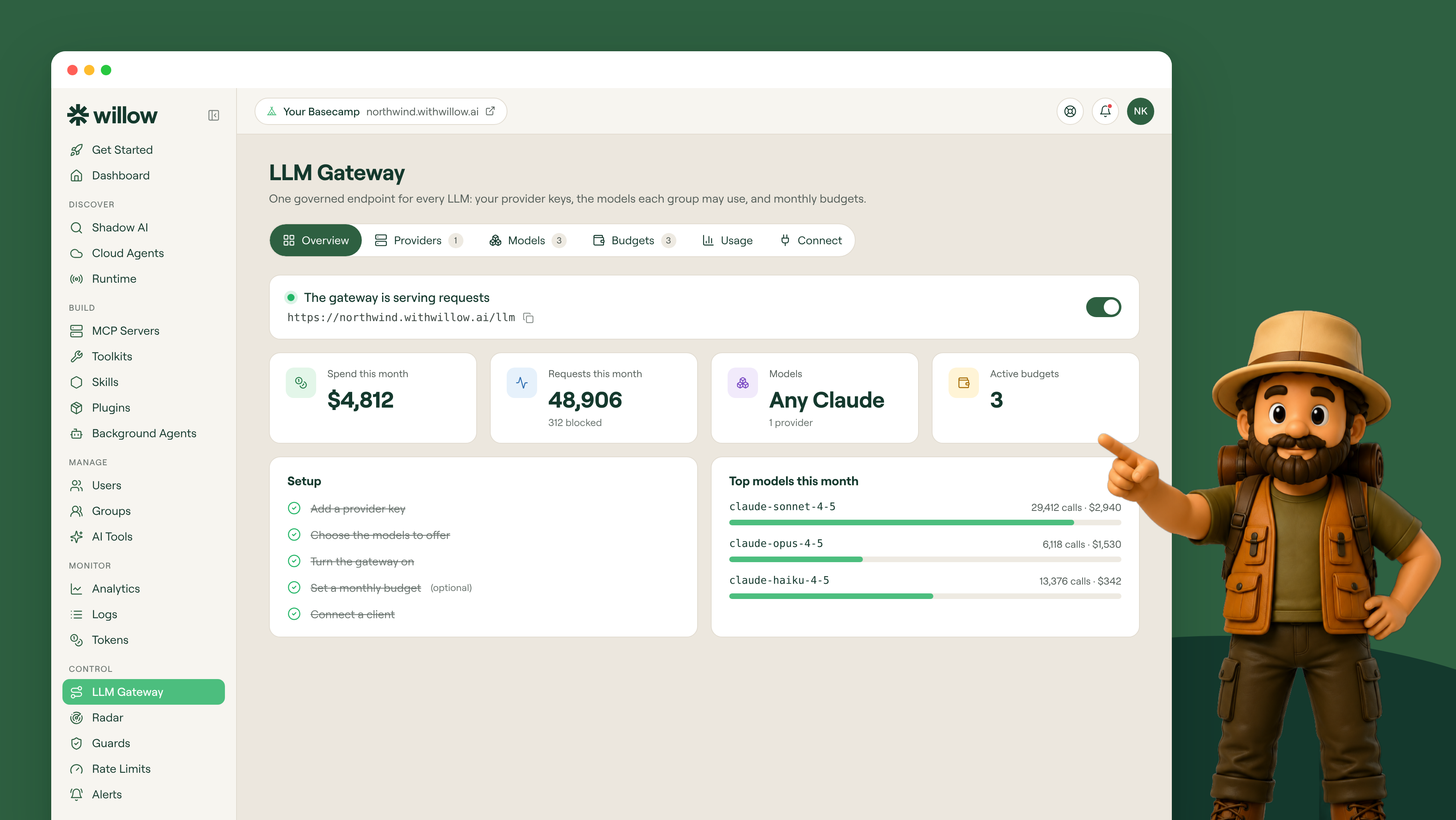
Every model behind one endpoint, with a spend cap: LLM Gateway. One controlled endpoint for every large language model your team uses. Add your Anthropic, OpenAI, or any OpenAI-compatible keys, decide which models each group is allowed to call, and set a monthly spend cap per group. Claude Code, Codex, and any tool on the OpenAI SDK connect with the user's Willow token, so you never distribute raw keys, and every call is logged with its model, token count, and cost. Visibility and cost control end up in one place. Set your first spend cap.
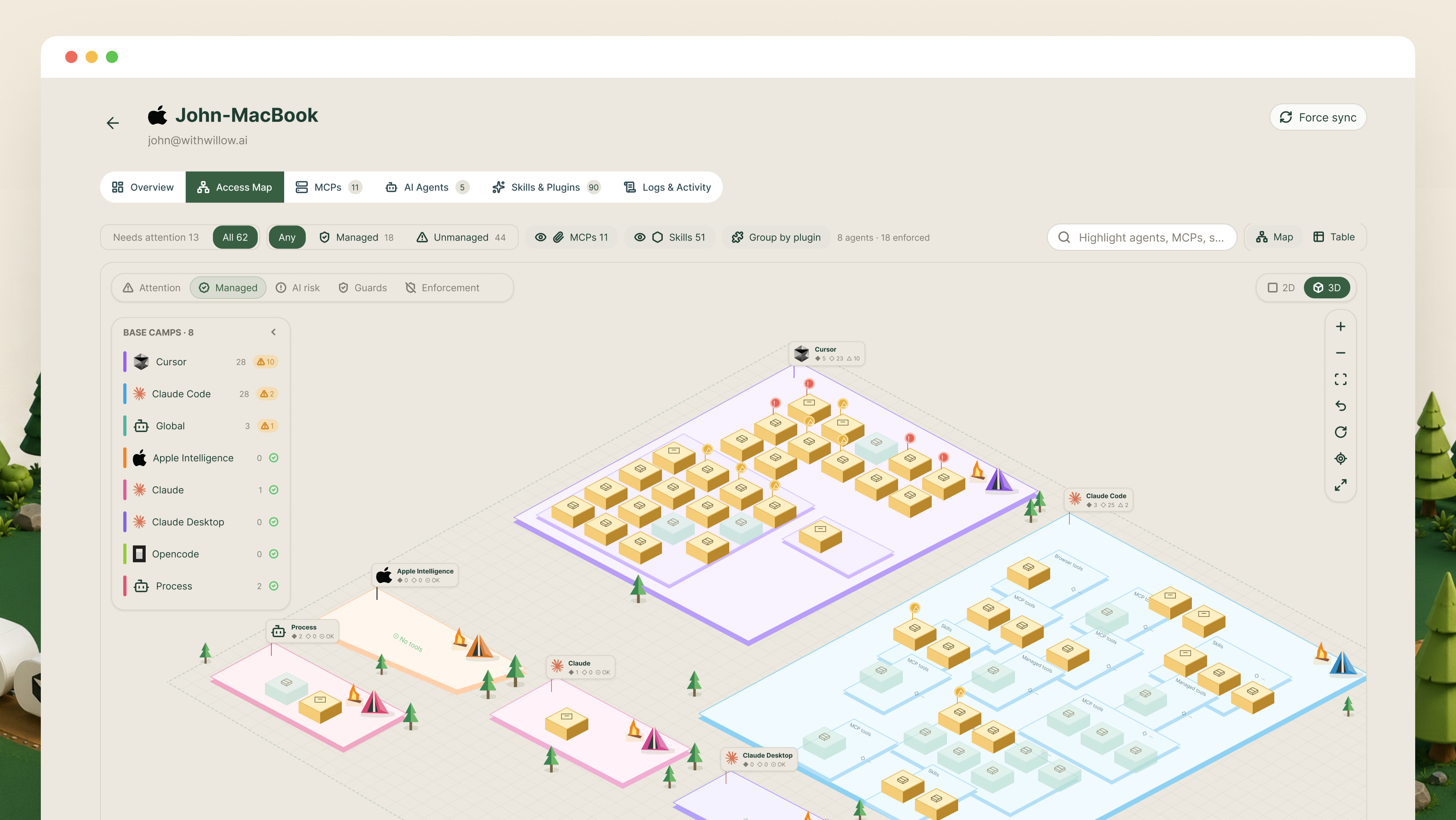
See where AI actually runs: Basecamp Access Map. A new visual map on the Devices tab lays out AI tool usage by group. For each tool it shows the MCP servers, skills, and plugins in use, plus a safety score, and known tools like Cursor, Claude Code, Copilot, and Codex get their own themed camps. Security teams get a quick read on where AI is used and which tools carry the most risk, without digging through a table. Open the Access Map.
See the agents you didn't build: Cloud Agent Discovery. Willow now scans the AI agents your company already runs on external platforms, from Copilot Studio and Azure AI Foundry to Claude Managed Agents, AWS AgentCore, Cursor, and Snowflake Cortex, whether Willow created them or not. Connect each platform with read-only credentials and you see every agent's model, instructions, tools, and recent activity, synced daily under a new Cloud Agents section in Discover. The agents running outside your walls stop being a blind spot. Connect your first platform.
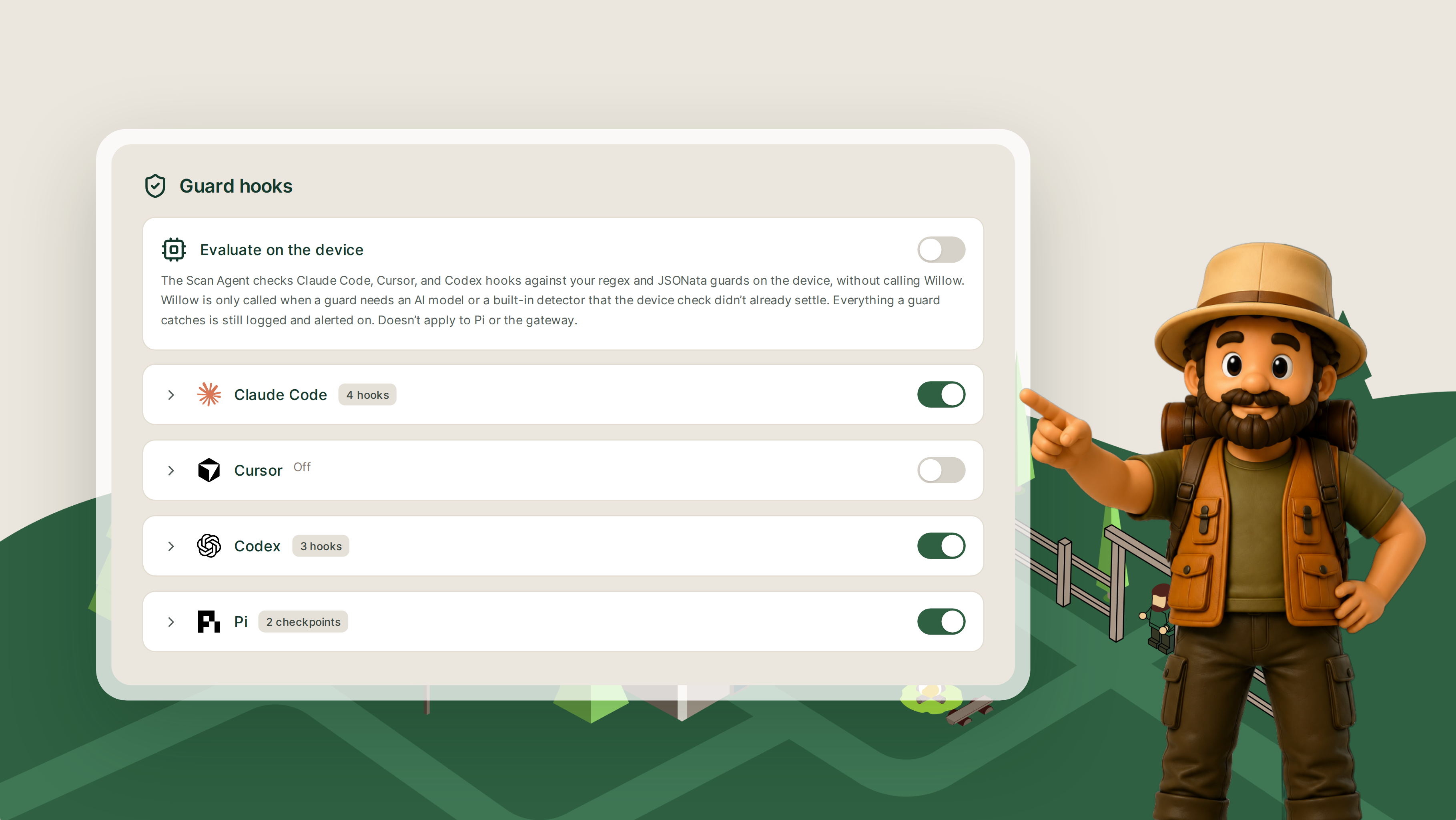
Guards that keep up with your developers: Run Guards on the Device. Regex and JSONata guards now run locally through the Scan Agent, so Claude Code, Cursor, and Codex check prompts, tool calls, and output on the spot without a round-trip to Willow every time. Guards that need an AI model still run in the cloud, and every catch is still logged centrally, so your flags and logs look exactly as they did before. Faster for developers, same audit trail for you. Turn on Guard hooks.
One agent, different jobs: Modes for Background Agents. Add a Modes tab to any background agent and define named prompts for different kinds of work. Investigate can tell the agent to gather context before acting; Implement can tell it to make changes directly. Each mode layers on top of the agent's base prompt, and admins assign modes to Slack channels or workflow steps, so the agent adjusts based on where each message came from. One agent covers several jobs without several prompts to maintain. Explore Agent Modes.
No plugin goes live unchecked: Plugin Security Review. Every plugin gets scanned before it goes live, whether an admin uploaded it or an end user added it in Connect. The scan checks it against your guard policies and gives it an AI risk score. You set the risk threshold and decide whether flagged plugins are held or rejected, and anything held waits in a Pending review queue until an admin signs off. Your team keeps adding plugins without opening a hole. Set your plugin risk threshold.
Connect the servers that used to lock you out: Local Sign-In for MCP Servers. Some official remote MCP servers only accept sign-ins from clients they recognize, like Claude or ChatGPT, so employees connected directly, outside your governance. With Local Sign-In, Willow registers as an accepted client and finishes the OAuth flow through the local agent on the user's machine. From then on, every tool call runs through the Willow gateway with the same permissions, guards, and audit logging as any other server, and you never have to get on a vendor's allowlist. Enable Local Sign-In
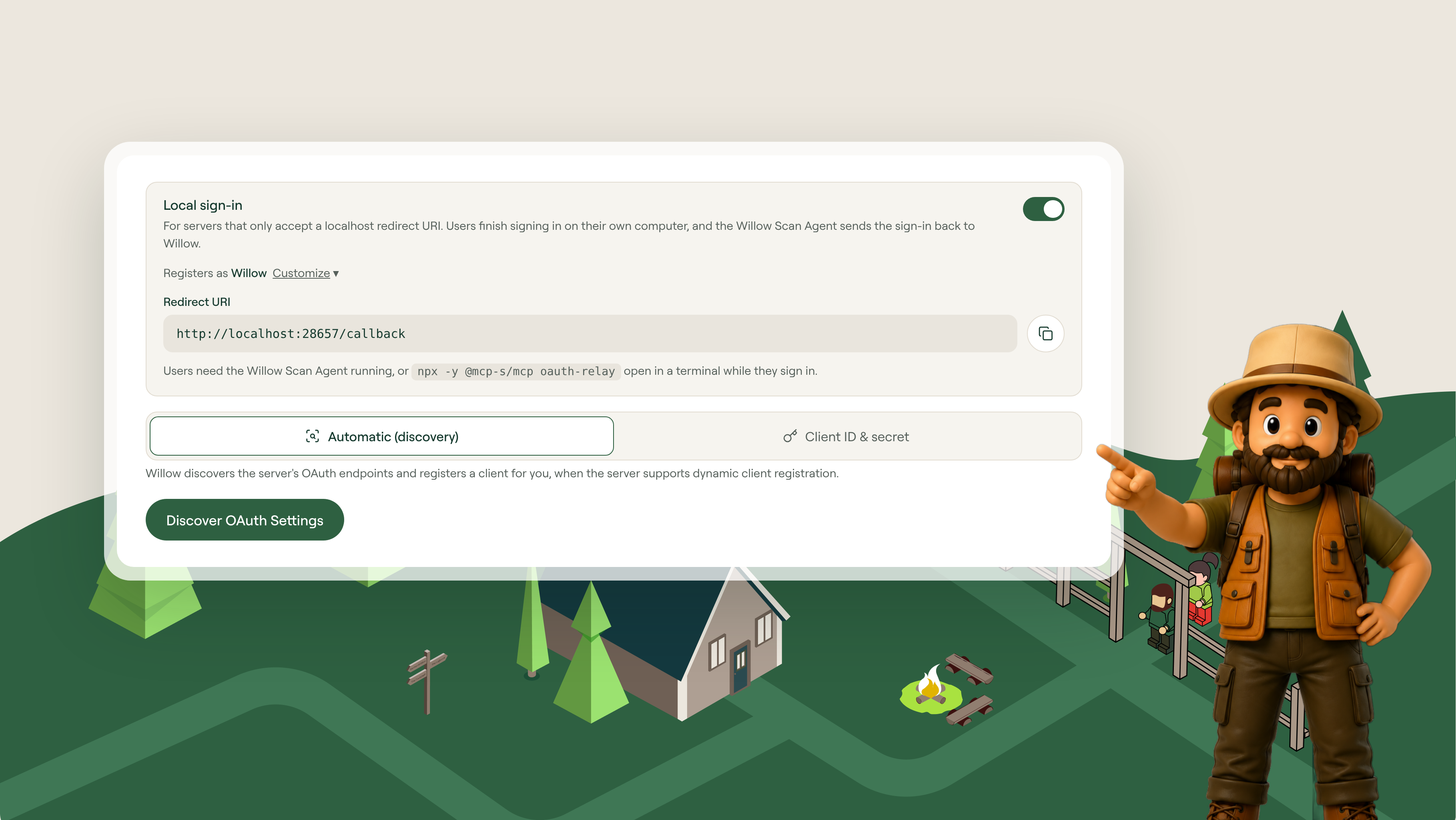
Also shipped this month: filters for guards, usage views for Shadow AI, AI Discovery for plugins, user anonymization in OTLP receivers, and routing for discovered MCPs.
New to watch and read
If you missed them, here's what's worth your time.
- One AI agent for the whole company, working as you. Demo with May, 1 min, Sep 15, 2026.
- MCP vs CLI vs API vs Browser: What Should Your Agent Use. Featuring Shalev, 27 min, Sep 30, 2026.
The pattern, if you're tracking it
Agents already act on their own in Willow, with a matching control for every capability. November is about making those agents carry more of the work without widening the blast radius. Memory, Modes, and voice messages let one background agent handle more kinds of work for more people. The LLM Gateway puts a ceiling on what that costs. And Cloud Agent Discovery, device-side guards, and Local Sign-In make sure the agents you can now scale are still the agents you can see and govern, wherever they run.
That's what moves background agents from a pilot to the work itself: not more trust, more proof.
Questions on anything above? Reach out, we read every one.
Background Agents in the Enterprise
Most teams can spin up an agent. Few can deploy one their security team signs off on. Here's the framework that does both.
FAQS
Everything you need to get your Basecamp running.


Your agents are already in the wild.
Give them a Basecamp. Go from AI chaos to AI work, in minutes.
